
Train Simulator 2013
Re: Train Simulator 2013
 by glenn68 » Thu Sep 20, 2012 8:07 pm
TDHenderson wrote:glenn68 wrote:I am having problems with the SW1500's. None of the scenarios will load.
Try opening the scenario in the editor, saving, exit editor, and try again.
Trevor
Did that, no success. Cant even click on the sw1500 and place it onto the tracks. I am validating my files right now.
-

glenn68 - Posts: 967
- Joined: Mon Aug 09, 2010 1:21 pm
Re: Train Simulator 2013
by MontanaRails » Thu Sep 20, 2012 8:07 pm
Quick Drive is fun - you never know whats going to come into view through the snowy fog (within prototypical constraints!)
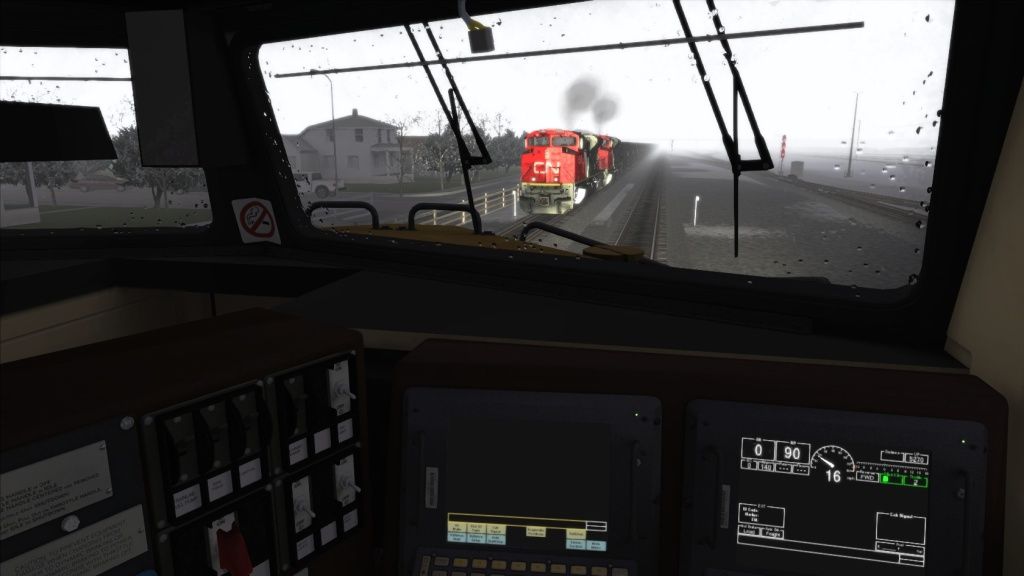

- MontanaRails
- Posts: 667
- Joined: Sun Nov 14, 2010 2:08 am
Re: Train Simulator 2013
by roinuj » Thu Sep 20, 2012 8:23 pm
Is anyone having problems with the CNSD40-2W Wide Nose pack not working? 
I take your clean locomotives and make them dirty!
My Railworks Reskins Website
My Graphics Website - dc2graphics.com
My Railworks Reskins Website
My Graphics Website - dc2graphics.com
-

roinuj - Posts: 301
- Joined: Mon Oct 31, 2011 11:37 am
- Location: Ontario, Canada
Re: Train Simulator 2013
by MattW » Thu Sep 20, 2012 8:35 pm
Anyone having problems with the London to Brighton signals not showing up? I've verified game cache, and cleared the blueprints cache, but still nothing.
- MattW
- Posts: 135
- Joined: Tue Jul 26, 2011 11:50 pm
Re: Train Simulator 2013
by XDriver » Thu Sep 20, 2012 9:06 pm
My sound went to crap after the update. I found a few users on FB with the same issues. Anybody here?
Here's a vid from another user demonstrating what I'm talking about.
http://www.youtube.com/watch?v=E7ff_S0CUVo
Here's a vid from another user demonstrating what I'm talking about.
http://www.youtube.com/watch?v=E7ff_S0CUVo

-
†

XDriver - R.I.P.
- Posts: 812
- Joined: Wed Oct 19, 2011 7:58 pm
- Location: Erie, Pa.
Re: Train Simulator 2013
by mikeg1250 » Thu Sep 20, 2012 9:12 pm
Only had a chance to play Sherman Hill for about a half hour and I love it!!!! Anyone else notice various mentions of "heritage equipment"?!?! Makes me think we may be seeing a revamped Challenger (i.e.3985) and an FEF3 (i.e. 844)!!!! 
- mikeg1250
- Posts: 131
- Joined: Tue Oct 26, 2010 4:22 pm
Re: Train Simulator 2013
by Noel » Thu Sep 20, 2012 9:15 pm
@roinuj
I am having problems too. My Centerbeams are missing.
I am having problems too. My Centerbeams are missing.
- Noel
- Posts: 1276
- Joined: Sat Apr 21, 2012 10:02 am
- Location: Planet Earth
Re: Train Simulator 2013
by GSkid » Thu Sep 20, 2012 9:22 pm
Well I haven't used 2013 a lot. What I did last night in 2012 was take screenshots with the FPS counter on the screen on several routes. One from the outside, one in the cab and one out the right side window. I used the exact same graphics settings on each shot, I didn't move the camera at all on any of them so they were all getting the same exact shot. Then I booted up 2013 and re-did the same exact screenshots with the counter on the screen.
FPS conclusions so far? I only saw an increase of 1-4fps..... with 1fps being the case on an overwhelming majority of the shots. I used all the exact same settings (TSX-ON, 8x anisotropic, 8x MSAA, all sliders on MAX, Depth of Field-ON, Bloom Lighting-OFF, Procedural Flora-OFF, Low Detail Shadows-OFF) as I did in 2012. But I noticed a couple things. In 2012 you could adjust Particle Density and Pedestrian Density..... in 2013 they are MISSING. So since I can't put those on MAX, it's not an apples to apples comparison UNLESS 2013 has those on MAX by default and doesn't let you adjust them. So not knowing what level those are set on, I can't be sure if my VERY MINOR increased FPS is due to a graphics engine improvement .....or due to 2013 setting the Particle Density and Pedestrian Density LOWER... thus putting a lighter load on the sim engine and increasing my FPS slightly as a result.
So needless to say... in the FPS department I'm not seeing the dramatic improvements as some here. I put in my sig my computer specs. It's a brand new HP laptop I got only 3 weeks ago. It is running in crossfire mode. I did test in single GPU mode in 2012 and I will see what 2013 improves on that front and get back to you guys on it. I actually have only 4GB, but my other 4GB arrives tomorrow or Saturday so I put 8GB on my sig ahead of time. I HIGHLY doubt that increasing to 8GB RAM is gonna increase FPS. My CPU is a brand new dual-core (went with that cuz it's my understanding Railworks doesn't use more then 2 cores at present), but it is NOT a multi-threaded CPU. I'm not sure if Railworks is multi-threaded or if it would make a big difference in FPS if it did. I was on a budget but it works really well. I get very decent frame rates with it.
I did notice on Castle Rock and on another route that the default camera was in a little different position and angle then in 2012. In most other cases it was the same. I haven't tried it on all routes or scenarios to see if it changed in others.
On Donner Pass the headlight SEEMED brighter and further down the track. But I didn't take a picture of it in 2012 to see if it's really changed in 2013 or not. It could be just my mind THINKING it's different. Otherwise I haven't seen any change in graphics quality. Everything seems to be about the same. I wasn't expecting to see anything dramatic anyways, so no real disappointment in that department. Maybe it only looks better with the NEW 2013 routes. I haven't got those yet since I only got the free 2013 update. I will buy Sherman Hill later to see. Anybody notice a graphics improvement on that route?
I'm off to play with it some more and will chime in later.
FPS conclusions so far? I only saw an increase of 1-4fps..... with 1fps being the case on an overwhelming majority of the shots. I used all the exact same settings (TSX-ON, 8x anisotropic, 8x MSAA, all sliders on MAX, Depth of Field-ON, Bloom Lighting-OFF, Procedural Flora-OFF, Low Detail Shadows-OFF) as I did in 2012. But I noticed a couple things. In 2012 you could adjust Particle Density and Pedestrian Density..... in 2013 they are MISSING. So since I can't put those on MAX, it's not an apples to apples comparison UNLESS 2013 has those on MAX by default and doesn't let you adjust them. So not knowing what level those are set on, I can't be sure if my VERY MINOR increased FPS is due to a graphics engine improvement .....or due to 2013 setting the Particle Density and Pedestrian Density LOWER... thus putting a lighter load on the sim engine and increasing my FPS slightly as a result.
So needless to say... in the FPS department I'm not seeing the dramatic improvements as some here. I put in my sig my computer specs. It's a brand new HP laptop I got only 3 weeks ago. It is running in crossfire mode. I did test in single GPU mode in 2012 and I will see what 2013 improves on that front and get back to you guys on it. I actually have only 4GB, but my other 4GB arrives tomorrow or Saturday so I put 8GB on my sig ahead of time. I HIGHLY doubt that increasing to 8GB RAM is gonna increase FPS. My CPU is a brand new dual-core (went with that cuz it's my understanding Railworks doesn't use more then 2 cores at present), but it is NOT a multi-threaded CPU. I'm not sure if Railworks is multi-threaded or if it would make a big difference in FPS if it did. I was on a budget but it works really well. I get very decent frame rates with it.
I did notice on Castle Rock and on another route that the default camera was in a little different position and angle then in 2012. In most other cases it was the same. I haven't tried it on all routes or scenarios to see if it changed in others.
On Donner Pass the headlight SEEMED brighter and further down the track. But I didn't take a picture of it in 2012 to see if it's really changed in 2013 or not. It could be just my mind THINKING it's different. Otherwise I haven't seen any change in graphics quality. Everything seems to be about the same. I wasn't expecting to see anything dramatic anyways, so no real disappointment in that department. Maybe it only looks better with the NEW 2013 routes. I haven't got those yet since I only got the free 2013 update. I will buy Sherman Hill later to see. Anybody notice a graphics improvement on that route?
I'm off to play with it some more and will chime in later.
EMD 2-strokes rule! My all time favorite: SD45X also love the SD40-2/SD40T-2/SD45-2/SD45T-2/DD35A/DDA40X/SD70ACe/SD80ACe
Southern Pacific RR! Bloody nose/Serif lettering - Donner Pass/Tehachapi Pass/Cajon Pass/UP Coast Line
i7-11800H // RTX 3070 // 16GB DDR4 // 2TB SSD // 16” 165Hz WQXGA 16:10 w/G-Sync // TS Classic // TSW5 // Run 8 V3
Southern Pacific RR! Bloody nose/Serif lettering - Donner Pass/Tehachapi Pass/Cajon Pass/UP Coast Line
i7-11800H // RTX 3070 // 16GB DDR4 // 2TB SSD // 16” 165Hz WQXGA 16:10 w/G-Sync // TS Classic // TSW5 // Run 8 V3
-

GSkid - Posts: 1197
- Joined: Fri Sep 07, 2012 2:17 am
- Location: UP's Santa Barbara subdivision - USA
Re: Train Simulator 2013
by roinuj » Thu Sep 20, 2012 10:17 pm
Noel wrote:@roinuj
I am having problems too. My Centerbeams are missing.
I'm finding all the freight cars in that DLC are missing. I've also found the SW1500 is not working. I also noticed neither DLC is listed on Steam. might be why they are not working. I sent an email to RSC support. maybe if more people with DLC not working write them, something will happen.
I take your clean locomotives and make them dirty!
My Railworks Reskins Website
My Graphics Website - dc2graphics.com
My Railworks Reskins Website
My Graphics Website - dc2graphics.com
-
roinuj - Posts: 301
- Joined: Mon Oct 31, 2011 11:37 am
- Location: Ontario, Canada
Re: Train Simulator 2013
by XDriver » Thu Sep 20, 2012 10:33 pm
They posted this on FB.
From
RailSimulator.com
Hey everyone. Thanks for you comments. Thanks to everybody who has pre-ordered or purchased Train Simulator 2013. We are aware that the included routes (Sherman Hill, NEC, London-Brighton & Isle of Wight) are not downloading. The download process has not finished from Steam and the routes will follow shortly. More news as we get it.
Maybe this will shed some light on all the other stuff you don't have yet.
I sent them an email on the sound issue. I can't play it all because of that. I think it's a Sound Blaster card issue. Others that have them, same deal.
From
RailSimulator.com
Hey everyone. Thanks for you comments. Thanks to everybody who has pre-ordered or purchased Train Simulator 2013. We are aware that the included routes (Sherman Hill, NEC, London-Brighton & Isle of Wight) are not downloading. The download process has not finished from Steam and the routes will follow shortly. More news as we get it.
Maybe this will shed some light on all the other stuff you don't have yet.
I sent them an email on the sound issue. I can't play it all because of that. I think it's a Sound Blaster card issue. Others that have them, same deal.
-
†
XDriver - R.I.P.
- Posts: 812
- Joined: Wed Oct 19, 2011 7:58 pm
- Location: Erie, Pa.
Re: Train Simulator 2013
by bpetit » Thu Sep 20, 2012 10:39 pm
RIP .rwps
"If you really needed a diesel locomotive right away, then go ahead and order a ALCO. But if you could wait for real quality, then go for an EMD or a GE".
My Youtube Channel (Railfanning and Train Simulator 2018)
http://www.youtube.com/user/3985gtasa
http://www.youtube.com/user/3985gtasa
-

bpetit - Posts: 1985
- Joined: Sun Sep 19, 2010 9:44 pm
- Location: New Orleans, Louisiana
Re: Train Simulator 2013
by SuperTux » Thu Sep 20, 2012 10:41 pm
XDriver wrote:They posted this on FB.
From
RailSimulator.com
Hey everyone. Thanks for you comments. Thanks to everybody who has pre-ordered or purchased Train Simulator 2013. We are aware that the included routes (Sherman Hill, NEC, London-Brighton & Isle of Wight) are not downloading. The download process has not finished from Steam and the routes will follow shortly. More news as we get it.
Maybe this will shed some light on all the other stuff you don't have yet.
I sent them an email on the sound issue. I can't play it all because of that. I think it's a Sound Blaster card issue. Others that have them, same deal.
From another forum I saw mention of Alchemy causing issues, so maybe try disabling that if you have it running.
- SuperTux
- Posts: 22
- Joined: Fri Nov 11, 2011 8:34 pm
Re: Train Simulator 2013
by SuperTux » Thu Sep 20, 2012 10:43 pm
MattW wrote:Anyone having problems with the London to Brighton signals not showing up? I've verified game cache, and cleared the blueprints cache, but still nothing.
Just had a quick run out of Victoria with no issues like this, try restarting Steam completely and then try the verification process again.
- SuperTux
- Posts: 22
- Joined: Fri Nov 11, 2011 8:34 pm
Re: Train Simulator 2013
by Chacal » Thu Sep 20, 2012 10:55 pm
No problem at all with the update.
I like the new interface, especially the "single player" part where you can find all your old stuff.
A little puzzled about the disappearance of utilities from the menu, and some options such as multi-core.
In-game, the new small hub is great, and my favorite feature is the new 2D map.
I dislike the new "collections" interface, but I suspect it is a problem with data. The filters are based on data that is often missing or incorrect. For example, most 3rd-party DLC has missing information about engines used, difficulty level, time required, etc.
If I click on the GG1 collection I can run the GG1 on the NEC, but if I choose the NEC I can't select the GG1 to run on it.
I like the new interface, especially the "single player" part where you can find all your old stuff.
A little puzzled about the disappearance of utilities from the menu, and some options such as multi-core.
In-game, the new small hub is great, and my favorite feature is the new 2D map.
I dislike the new "collections" interface, but I suspect it is a problem with data. The filters are based on data that is often missing or incorrect. For example, most 3rd-party DLC has missing information about engines used, difficulty level, time required, etc.
If I click on the GG1 collection I can run the GG1 on the NEC, but if I choose the NEC I can't select the GG1 to run on it.
Over the hill and gathering speed
- Chacal
- Site Admin
- Posts: 6532
- Joined: Tue Jul 05, 2011 1:11 pm
- Location: Quebec, Canada
Who is online
Users browsing this forum: No registered users and 1 guest