New rolling stock

Discussion of rolling-stock creation & re-painting.

Re: New rolling stock

Postby mrennie » Thu Oct 09, 2014 9:59 am

danpmeyer wrote:Well, I'm not sure as far as what the issue is. I have created cars before and have never had this particular problem. I can create the .igs into a scenery object, but not into a wagon. When I create the wagon blueprint, the editor goes through and processes the preview with no errors and then when it gets to the shapeviewer, there is nothing to be seen, except the coupling arrows. I am using Blender 2.63, the exporter for TS20xx and TS2015. I can view all of my cars made before the installation of the latest exporter and TS2015, and the car I just made as a static, but not as a wagon. As a question, what does instanscible mean? There is a checkbox in the render section that is unchecked. Is that an issue? As far as the hierarchy and object names, I have the parents, children and main object set as I always do, and the exporter adds on the level and LOD prefixes. There may be a typo in the blueprint and I do need to use the fine tooth comb and go over it, which I haven't had time to do. Just wondering if there was a change since I last made a car...those of you who have seen my AutoMax cars know that I can build a model that goes into the sim, getting it to stay on the track, well...

Daniel


Make sure you don't have any empty groups/nodes in the model, or two or more groups/nodes with the same name. I've had that problem in the past when exporting a model made in 3DC.

User avatar
mrennie
 
Posts: 3214
Joined: Wed May 30, 2012 12:22 pm

Re: New rolling stock

Postby MaineLines » Thu Oct 09, 2014 10:36 am

Daniel,

I do not know what the instanceable checkbox is for either, but I have recently (TS2015) been able to successfully export my Railbox project without that box being checked. My guess is that your model is OK and that there is an error in your Blueprint. Each time that I do this I think it is going to be easier because I have done it before but it never is. I just find new ways to make a mistake!

Larry
User avatar
MaineLines
 
Posts: 622
Joined: Mon Sep 14, 2009 11:21 am

Re: New rolling stock

Postby danpmeyer » Thu Oct 16, 2014 7:18 am

Well, MaineLines hit it on the head. After copying a blueprint from a previous creation that worked and changing the model referenced, my new car showed up. After a line by line examination, here's what the issues were:

First start out with the wagon blueprint, not the carriage one.
Second, when you reference your bogeys, the Blueprint ID filename reference after the Provider and Product must include the .xml extension or it doesn't allow the car to be previewed.
I'm guessing if there's no bogies it's not a wagon...

Go figure. !DUH!

Thanks for the help everybody.

Daniel
danpmeyer
 
Posts: 65
Joined: Sun Jan 22, 2012 4:46 pm

Re: New rolling stock

Postby ColoradoRailfan » Thu Oct 16, 2014 9:19 pm

Can we please get to see a screenshot of the cars in game? Would like some teasers.
Moffat Tunnel W.I.P
User avatar
ColoradoRailfan
 
Posts: 591
Joined: Mon Jul 14, 2014 11:17 am
Location: Denver, CO

Re: New rolling stock

Postby danpmeyer » Fri Oct 17, 2014 9:01 pm

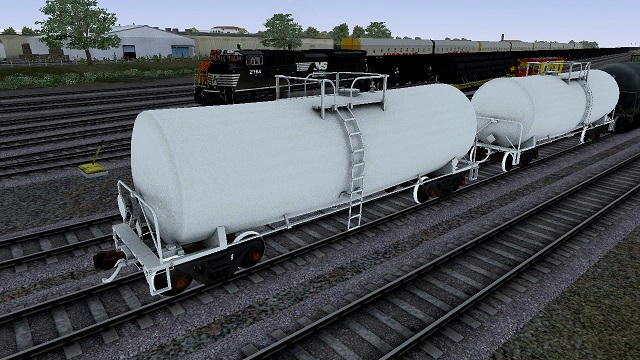
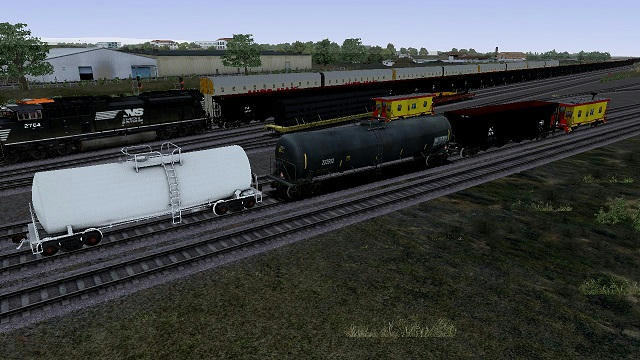
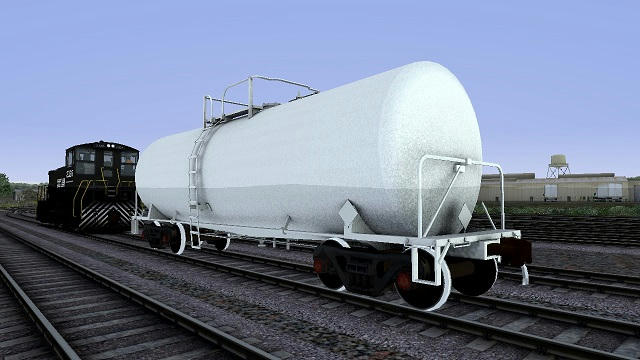
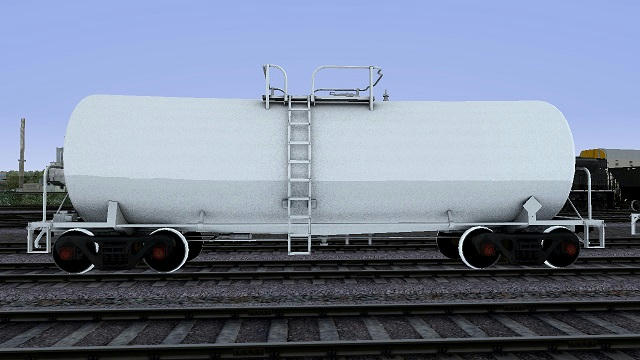
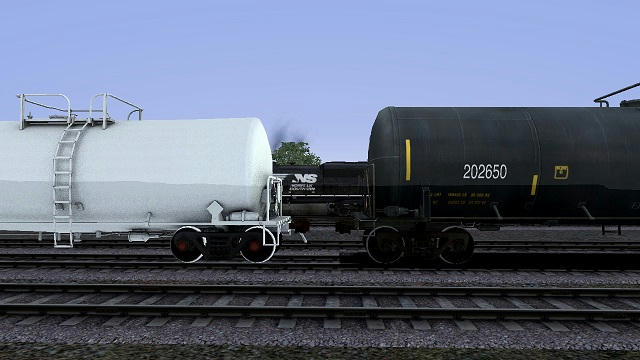
Ok, so here are some screen shots of the undecorated Corn Syrup Tankcar I've been working on. The finished version will have decals and polished wheel treads, if I can work out how to set the UV arguments in Blender. Not ready for beta tests yet, but close. Open for modeling suggestions and the paint job is just the AO bake from Blender.

This one shows the car next to another one.
Image

Here's the BNSF black tank car for comparison, plus some other things I'm working on (still)
Image

When completed that brace will go to the other one, and I might have double shelf couplers for tanks and such.
Image

Side view showing the tank slope and with the horizon line showing through the car...(grrrr)
Image

And a closer view of the CS tank and the black stock tank.
Image

Thoughts, anyone?

Daniel
danpmeyer
 
Posts: 65
Joined: Sun Jan 22, 2012 4:46 pm

Re: New rolling stock

Postby MaineLines » Sat Oct 18, 2014 11:01 am

Very nice looking model. As for wheel tread textures, I haven't found the magic formula yet either , so I reverted to the old MSTS trick of making the treads a part of the truck(bogie) instead of the wheel so that they swivel but don't rotate and applying a shiny tread photo texture.
User avatar
MaineLines
 
Posts: 622
Joined: Mon Sep 14, 2009 11:21 am

Re: New rolling stock

Postby ColoradoRailfan » Sat Oct 18, 2014 3:37 pm

danpmeyer wrote:Here's the BNSF black tank car for comparison, plus some other things I'm working on (still)
Image


Are those Black Hopper cars the RD-4 Hoppers? If they are then they look kinda small, they dont look like the right size, then again it is a WIP.
Will these cars be repaintable?
Moffat Tunnel W.I.P
User avatar
ColoradoRailfan
 
Posts: 591
Joined: Mon Jul 14, 2014 11:17 am
Location: Denver, CO

Re: New rolling stock

Postby danpmeyer » Sat Oct 18, 2014 7:32 pm

No, those are not the RD-4's. Those still need exported. Those hoppers are the B&LE HT48 100 ton 4 bays. They are very close in size to the RD-4's which are 50' over the strikers, according to the drawing I have from BNSF. The other cars shown are a bay window caboose, Auto-Max cars (v6 no tipping or derailing issues) and some stock TS2015 flatcars.

They should be able to be repainted.

Daniel
danpmeyer
 
Posts: 65
Joined: Sun Jan 22, 2012 4:46 pm

Re: New rolling stock

Postby dejoh » Tue Oct 21, 2014 8:20 pm

Just wanted to show this piece of art. Created by Mainlines, a long time ago. I actually thought I lost it. I give all you builders credit for making this sim the sharpest of the bunch.
Looking forward to all the new rolling stock coming down the production line.
2014-10-21_00007.jpg
You do not have the required permissions to view the files attached to this post.
User avatar
dejoh
 
Posts: 1478
Joined: Mon Feb 16, 2009 5:08 pm
Location: So. Chicago Heights, Il.

Re: New rolling stock

Postby ColoradoRailfan » Sun Oct 26, 2014 10:32 am

Any updates on this Dan?
Moffat Tunnel W.I.P
User avatar
ColoradoRailfan
 
Posts: 591
Joined: Mon Jul 14, 2014 11:17 am
Location: Denver, CO

Re: New rolling stock

Postby Kali » Mon Oct 27, 2014 9:39 am

http://the-art-of-rws.blogspot.co.uk/20 ... rials.html - you probably read that already but it's a useful start for wheels. I personally would probably use TrainSpecEnvMask so I could adjust the specular in alpha, but personal choice.

Anyone know if using the same shader with different parameters causes another draw call?
Kali
 
Posts: 1600
Joined: Mon Mar 14, 2011 1:00 am
Location: England-by-Sea

Re: New rolling stock

Postby danpmeyer » Tue Oct 28, 2014 8:04 am

Kali,

Yep I've looked at Derek' work before. Very informative. For your wheels, do you include the tread as part of the rolling portion or is it static? I like to make my treads rolling, since it looks better where the face meets the tread. I'm trying to use the TrBumpSpec, but I need to work on getting the phong UV arg into the Blender exporter, using the file for the exporting directions.

I'd think using different parameters would result in a new draw call, since the shader would be "different" or needed to be reloaded. Wouldn't the draw calls be based on the material, so new parameters = new materials = new draw calls?

Colorado- Been working on decaling. Getting flat planes to project onto curved tank surfaces is a real...might just use a large texture for the body and the decals together. Might make repainting easier later.

MaineLines- just dl'ed got your Per diem box. Very nice. Would like to talk about your LOD's and what programs you use for creation.

As a general question about air hoses, are people using the RCAP couplers with their air hoses or should the hoses be built onto the model for people using the default or Britkits couplers?

Thanks, Daniel
danpmeyer
 
Posts: 65
Joined: Sun Jan 22, 2012 4:46 pm

Re: New rolling stock

Postby Kali » Tue Oct 28, 2014 8:40 am

Mine are part of the wheel, so rolling. Can't help with shader arguments in Blender, I'm afraid :S

I'd suspect it would be a new draw call too, so I guess attempting to use the same shader everywhere is a bit pointless.
Kali
 
Posts: 1600
Joined: Mon Mar 14, 2011 1:00 am
Location: England-by-Sea

Re: New rolling stock

Postby MaineLines » Tue Oct 28, 2014 8:56 am

Thanks, I am using 3ds Max 2010 for modelling and LOD generation, and I use my own couplers with integral air hose like Britkits.
User avatar
MaineLines
 
Posts: 622
Joined: Mon Sep 14, 2009 11:21 am

Re: New rolling stock

Postby jpetersjr » Tue Oct 28, 2014 11:04 am

danpmeyer wrote:Ok, so here are some screen shots of the undecorated Corn Syrup Tankcar I've been working on. The finished version will have decals and polished wheel treads, if I can work out how to set the UV arguments in Blender. Not ready for beta tests yet, but close. Open for modeling suggestions and the paint job is just the AO bake from Blender.

This one shows the car next to another one.
Image

Here's the BNSF black tank car for comparison, plus some other things I'm working on (still)
Image

When completed that brace will go to the other one, and I might have double shelf couplers for tanks and such.
Image

Side view showing the tank slope and with the horizon line showing through the car...(grrrr)
Image

And a closer view of the CS tank and the black stock tank.
Image

Thoughts, anyone?

Daniel


I believe the thing you're seeing is one of the many RW bugs. I've seen it before with my scenery items, such as the horizon line trying to show through the buildings, only to restart the sim to have it appear normal with no horizon line showing through the item.

So, I don't believe it's a problem with your model, I think it's just a bug you're seeing. Also, if you look closely you can see the horizon line showing through that building in the background as well and all the other train cars in the picture.

Try restarting the sim and then check the model again, perhaps this time it will appear normal with no horizon line appearing through it.
Jonathan Burton Peters Jr, Big J

The Legend Of The New York Central System Shall Live Again In TS2021.


Website

https://jpetersjr1.wixsite.com/big-j-productions

3D Freeware Scenery Developer Since 2011
User avatar
jpetersjr
 
Posts: 4010
Joined: Tue Apr 26, 2011 6:31 pm
Location: Mobile, Alabama, United States,

PreviousNext

Return to Rolling-Stock Design

Who is online

Users browsing this forum: No registered users and 57 guests