
What I am gathering from this is that the azimuth angle is specific to your route's latitude, and would have have to be adjusted from route to route. I too had thought the ever-blue was a sun problem because noon on the summer solstice seemed too much like December.
So, you'd need to develop four angles, one for each season, although Spring and Autumn would be quite close.
What is not clear is what we are measuring. Intuition seems to suggest the highest angle the sun achieves above the horizon on each of the four days of seasonal change (solstice and equinox, 2 each).
Now comes the Trial and Error! Error? What's the worst that could happen? Turning off the Sun?
Azimuth Angle and You
Re: Azimuth Angle and You
 by Paragon » Mon Oct 03, 2011 9:13 pm
-

Paragon - Posts: 123
- Joined: Thu Jul 07, 2011 4:16 pm
- Location: Silverdale, WA
Re: Azimuth Angle and You
by Paragon » Mon Oct 03, 2011 9:45 pm
Man those pics are VERY nice!
After a bit of this and that, the Azimuth Angle is indeed the highest angle the sun can achieve on each of the days of seasonal change.
I found a web site that makes these calculations for you and it seems to span the globe:
http://solarelectricityhandbook.com/sol ... lator.html
These values will need to be plugged into your TimeOfDay\Core_ season files. Let's use the default summer blueprint as an example:
W:\Assets\Kuju\RailSimulatorCore\TimeOfDay\Core_Summer.bin
Here is the entry for my route, which is roughly the same latitude as Fresno, CA, which is 76 degrees on June 21:
<AzimuthAngle d:type="sFloat32" d:alt_encoding="000000000000F0BF" d:precision="string">76.0000</AzimuthAngle>
The shadow angles tell the tale, and the brightness is very nice to see! I think this will help a LOT with some of the adaptations we are all making to TS2012.
After a bit of this and that, the Azimuth Angle is indeed the highest angle the sun can achieve on each of the days of seasonal change.
I found a web site that makes these calculations for you and it seems to span the globe:
http://solarelectricityhandbook.com/sol ... lator.html
These values will need to be plugged into your TimeOfDay\Core_ season files. Let's use the default summer blueprint as an example:
W:\Assets\Kuju\RailSimulatorCore\TimeOfDay\Core_Summer.bin
Here is the entry for my route, which is roughly the same latitude as Fresno, CA, which is 76 degrees on June 21:
<AzimuthAngle d:type="sFloat32" d:alt_encoding="000000000000F0BF" d:precision="string">76.0000</AzimuthAngle>
The shadow angles tell the tale, and the brightness is very nice to see! I think this will help a LOT with some of the adaptations we are all making to TS2012.
-
Paragon - Posts: 123
- Joined: Thu Jul 07, 2011 4:16 pm
- Location: Silverdale, WA
Re: Azimuth Angle and You
by Paragon » Mon Oct 03, 2011 9:56 pm
Being a complete idiot, I realized over-late that you need to adjust the angles from the web site from the zenith. In other words, start with 90 degrees, and subtract what the web site gives you. 76 degrees in summer becomes 14 in the config file:
<AzimuthAngle d:type="sFloat32" d:alt_encoding="000000000000F0BF" d:precision="string">14.0000</AzimuthAngle>
1,001 pardons!
<AzimuthAngle d:type="sFloat32" d:alt_encoding="000000000000F0BF" d:precision="string">14.0000</AzimuthAngle>
1,001 pardons!
-
Paragon - Posts: 123
- Joined: Thu Jul 07, 2011 4:16 pm
- Location: Silverdale, WA
Re: Azimuth Angle and You
by spec5sx » Mon Oct 03, 2011 10:31 pm
A problem I've run into with these files is that they can't be used in RW2. RSC turned up the alpha on these files and when you use them in non-TSX mode the terrain has a neon glow!
The word?..The word is no. I am, therefore, going anyway..
-

spec5sx - Posts: 213
- Joined: Sat Mar 07, 2009 9:39 pm
Re: Azimuth Angle and You
by Bananarama » Mon Oct 03, 2011 10:42 pm
You might want to check those values again. I haven't yet confirmed, but I believe the azimuth values in RW are between 0 and 1.5 (southern hemisphere), and 0 to -1.5 (northern hemisphere - both reversed from what they should be, by the way). '0' is at the equator, while 1.5 is at the south pole, and -1.5 at the north pole. A value of '14' for Fresno would make noon look like dawn (forcing a southern hemisphere), as I believe everything is ignored above 1.5 and below -1.5. Dividing the zenith 14 by 15 and adding the 'negative sign = -0.93333 gets things closer (keeping within the 1.5/-1.5 limits), but is still too high for central and southern CA. RSC has "some 'splaining" to do. 
Math makes my head hurt.
Math makes my head hurt.

-

Bananarama - Posts: 2749
- Joined: Sat Feb 14, 2009 1:17 am
- Location: Another Planet
Re: Azimuth Angle and You
by PapaXpress » Mon Oct 03, 2011 10:43 pm

"Just post some random unrelated text. We have members here who can help you with that." ~ Chacal
"When all else fails, read the instructions... if that doesn't work either, try following them." ~ Old Prof
The Grade Crossing - Atlanta North Project - Virtual Rail Creations
-

PapaXpress - Posts: 5147
- Joined: Sat Oct 23, 2010 10:30 pm
- Location: that "other" timezone
Re: Azimuth Angle and You
by Bananarama » Mon Oct 03, 2011 10:47 pm
-
Bananarama - Posts: 2749
- Joined: Sat Feb 14, 2009 1:17 am
- Location: Another Planet

Re: Azimuth Angle and You
by dick8299 » Tue Oct 04, 2011 7:58 am
So for the Horseshoe Curve route located roughly at Altoona, Pa. the correct azimuths would be:
Summer: -.24
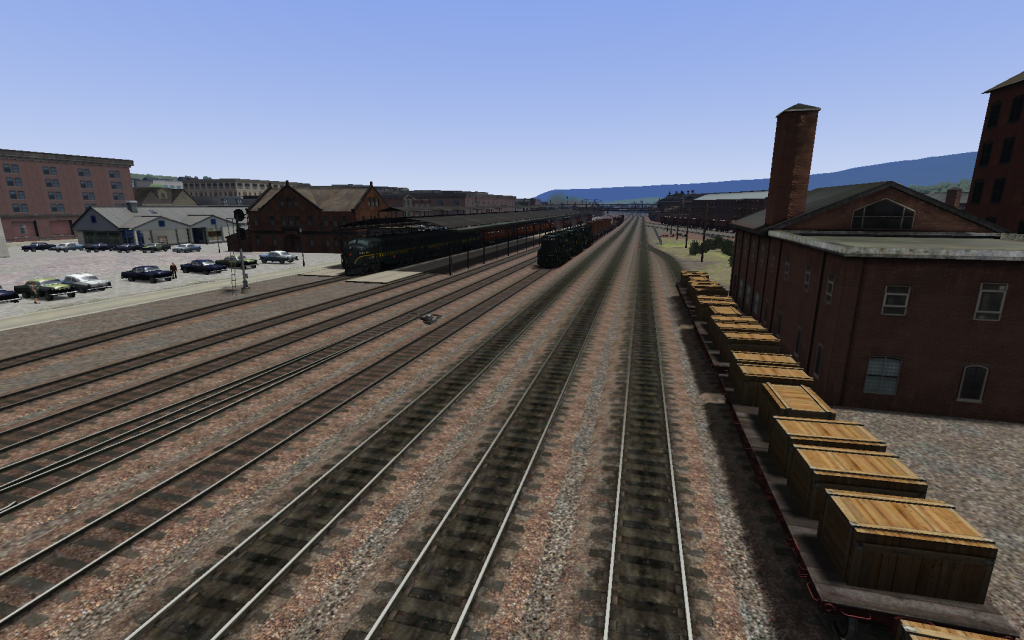
Spring Fall: -.67
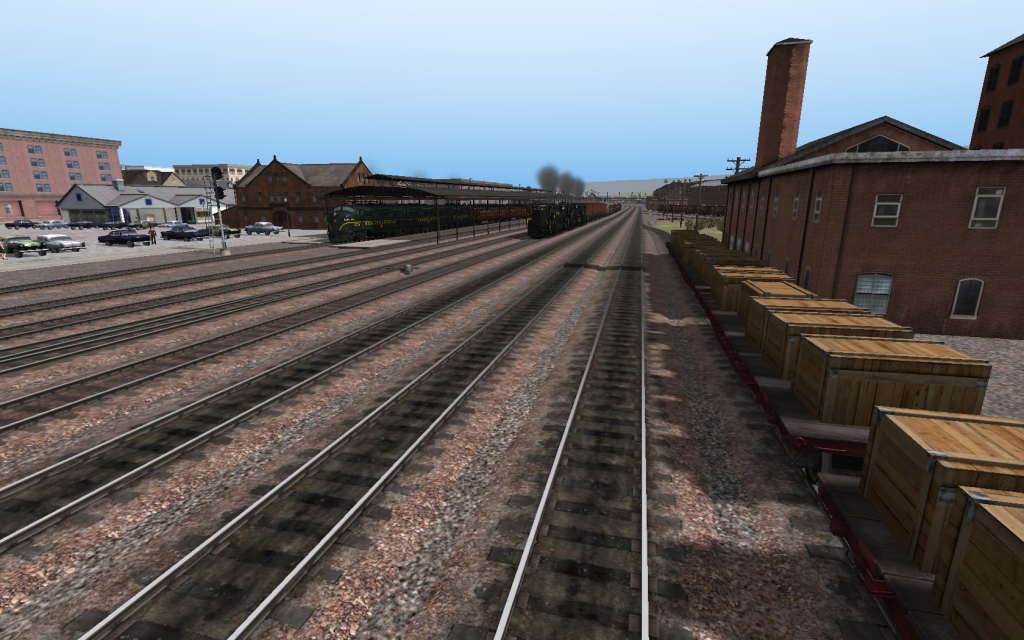
Winter: -1.08
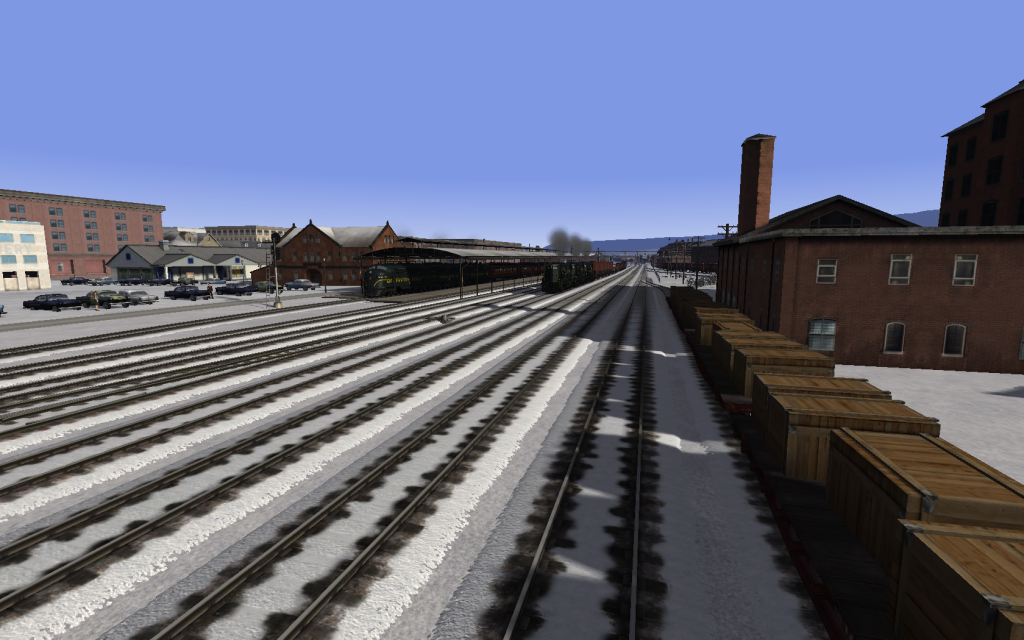
Do you agree? (Note all shots were taken with a Clear Sky at Noon in Altoona)
Summer: -.24
Spring Fall: -.67
Winter: -1.08
Do you agree? (Note all shots were taken with a Clear Sky at Noon in Altoona)
-

dick8299 - Posts: 385
- Joined: Sat Feb 28, 2009 7:50 am
Re: Azimuth Angle and You
by Bananarama » Tue Oct 04, 2011 11:23 am
Off the top of my head, the values between Spring/Autumn and Summer would be reversed, and Winter should be the lowest of the lot. An example:
Summer: -0.7
Spring/Autumn: -0.5
Winter: -0.4
The above numbers are just a guess - I don't know the exact values off hand. A "lower" value is not taking into account the negative/minus sign ('-'). The easiest way to think of the values is that the North Pole would be -1.5, and the Equator 0, thus if PA in the Summer is at -0.7, and Winter's sun is closer to the equator, Winter's azimuth value would logically be closer to '0'.
Summer: -0.7
Spring/Autumn: -0.5
Winter: -0.4
The above numbers are just a guess - I don't know the exact values off hand. A "lower" value is not taking into account the negative/minus sign ('-'). The easiest way to think of the values is that the North Pole would be -1.5, and the Equator 0, thus if PA in the Summer is at -0.7, and Winter's sun is closer to the equator, Winter's azimuth value would logically be closer to '0'.
-
Bananarama - Posts: 2749
- Joined: Sat Feb 14, 2009 1:17 am
- Location: Another Planet
Re: Azimuth Angle and You
by PapaXpress » Tue Oct 04, 2011 12:04 pm
A bit more info: http://www.solarplots.info/pages/definitions.aspx
Update:
Ok I think I am getting somewhere. Using the link above
Here is what I calculated for San Francisco CA
Take a look at the max and minimum angle. +150~-150
Seem familiar (150 == 1.5)? I am at work so I can't find out if in fact this is a simple matter of moving the decimal over two places, and if the value still needs to be negative (perhaps its the sun rise value?).
Update:
Ok I think I am getting somewhere. Using the link above
Here is what I calculated for San Francisco CA
Take a look at the max and minimum angle. +150~-150
Seem familiar (150 == 1.5)? I am at work so I can't find out if in fact this is a simple matter of moving the decimal over two places, and if the value still needs to be negative (perhaps its the sun rise value?).
You do not have the required permissions to view the files attached to this post.
"Just post some random unrelated text. We have members here who can help you with that." ~ Chacal
"When all else fails, read the instructions... if that doesn't work either, try following them." ~ Old Prof
The Grade Crossing - Atlanta North Project - Virtual Rail Creations
-
PapaXpress - Posts: 5147
- Joined: Sat Oct 23, 2010 10:30 pm
- Location: that "other" timezone
Re: Azimuth Angle and You
by dick8299 » Tue Oct 04, 2011 1:25 pm
In my pictures above the winter one has the longest shadows and the summer one has the shortest, so I do not think that I have the values reversed.
-
dick8299 - Posts: 385
- Joined: Sat Feb 28, 2009 7:50 am
Re: Azimuth Angle and You
by Paragon » Tue Oct 04, 2011 1:33 pm
My guess is because of the negative reversal bug, you have to flip the values, not only for Summer and Winter, but the slight difference from "center" of Autumn/Spring. If that made any sense. But we appear to be disarming this trap, thanks to PapaExpress' find. I have seen enough to start creating ToD blueprints to actually fit the route, which benefits from having very little visible change from season to season.
-
Paragon - Posts: 123
- Joined: Thu Jul 07, 2011 4:16 pm
- Location: Silverdale, WA
Re: Azimuth Angle and You
by PapaXpress » Tue Oct 04, 2011 1:43 pm
I wish the sun was out to day. I would walk out to the tracks out back (yes my place of work exists on my route, but I am not telling), take a picture and compare it to my route using the values that one site dialed in.
"Just post some random unrelated text. We have members here who can help you with that." ~ Chacal
"When all else fails, read the instructions... if that doesn't work either, try following them." ~ Old Prof
The Grade Crossing - Atlanta North Project - Virtual Rail Creations
-
PapaXpress - Posts: 5147
- Joined: Sat Oct 23, 2010 10:30 pm
- Location: that "other" timezone
Re: Azimuth Angle and You
by Toripony » Tue Oct 04, 2011 1:52 pm
Dick, assuming you are looking east in your screenies, your shadow lengths look about right to me. Another phenomenon of seasonal light change can be seen on the verticle building faces; southward facing walls get brighter in Winter and northward facing walls get darker. Also, watch for the color change of the shadows themselves as well as their edges; shadows are blacker and sharper-edged in Winter.
But I don't see the color and distance-view improvements that I saw in Spec5sx screenies. In his, the distant horizon colors are corrected; the haze is uncannily accurate for the Appalachian part of the country, and the closeup colors are more accurate, too (a greener tint to everything in Spring). The environment around us is tinted by the reflections off of vegetation and other objects. In Winter, things are bluer, and except for those who live in a concrete jungle in Spring they are greener, browner in fall, and as for Summer here in the Appalachians, everything has a blue haze because of a pheromone emitted by all the plants. Sky color is affected by Sun angle, too, as longer distances through the atmosphere filter out blue light and leave the reds and yellows we love so much in sunsets. And the depth of blue in the sky is most affected by moisture content; Winters provide more of those "deep blue" sky days because the moisture content of cold air is lower than warm air.
But I don't see the color and distance-view improvements that I saw in Spec5sx screenies. In his, the distant horizon colors are corrected; the haze is uncannily accurate for the Appalachian part of the country, and the closeup colors are more accurate, too (a greener tint to everything in Spring). The environment around us is tinted by the reflections off of vegetation and other objects. In Winter, things are bluer, and except for those who live in a concrete jungle in Spring they are greener, browner in fall, and as for Summer here in the Appalachians, everything has a blue haze because of a pheromone emitted by all the plants. Sky color is affected by Sun angle, too, as longer distances through the atmosphere filter out blue light and leave the reds and yellows we love so much in sunsets. And the depth of blue in the sky is most affected by moisture content; Winters provide more of those "deep blue" sky days because the moisture content of cold air is lower than warm air.
-

Toripony - Posts: 1083
- Joined: Thu Jun 04, 2009 3:13 am
72 posts
• Page 2 of 5 • 1, 2, 3, 4, 5
Who is online
Users browsing this forum: No registered users and 1 guest