
F7 Repaints
First unread post • 5 posts
• Page 1 of 1
F7 Repaints
 by Shayfan1 » Sun May 13, 2012 3:18 am
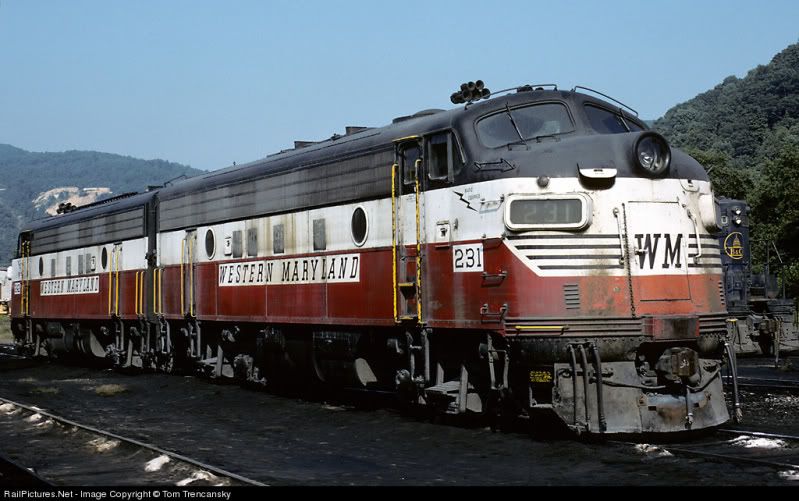
I use Gimp since its free. So my question is how on earth can you tell what to paint on the default F7? Solid colors are pretty basic. I tried to do my own version of a Western Maryland F7 (since we don't have a single head light version) in their circus colors livery. I was pleased with it for the most part but there are so many little parts of trim I couldn't get it right. Do any of you paint masters have any tricks for making everything line up? This is one of the major Chessie System roads that is not very well represented in game in its orginal liverys. I would like to change that starting with the F units. Any help would of course be appreciated. In case anyone is wondering the is the scheme I am referring to.
-

Shayfan1 - Posts: 174
- Joined: Sun Apr 17, 2011 2:39 am
- Location: Mountaineer Country, WV
Re: F7 Repaints
by Bananarama » Sun May 13, 2012 9:30 am
I have a set of templates on my forum:
http://www.3dtrains.com/forums/index.ph ... opic=16671
Registration required.
http://www.3dtrains.com/forums/index.ph ... opic=16671
Registration required.

-

Bananarama - Posts: 2749
- Joined: Sat Feb 14, 2009 1:17 am
- Location: Another Planet
Re: F7 Repaints
by ATSF3814 » Sun May 13, 2012 12:01 pm
Probably the biggest tip I can give you is do EVERYTHING in a new layer. Whether it's adding a new color, logo, or whatever. Always do it in a new layer. Here's a good example:

This template has 16 different layers on it. All the base colors, logos, numbers and lines have their own layer. What this does is it lets you easily adjust and reposition any part of your repaint in just a few seconds. It also saves you a huge amount of headache if you screw up on something since having to delete and redo only one layer isn't usually a big deal.
As for getting everything lined up, well that's really just a process of trial and error. And it's where the RW_Tools asset viewer really comes in handy. It will let you quickly preview what your repaint will look like in-game so you can make adjustments to it. It's much quicker than loading up a route in RW just to preview your repaint.
This template has 16 different layers on it. All the base colors, logos, numbers and lines have their own layer. What this does is it lets you easily adjust and reposition any part of your repaint in just a few seconds. It also saves you a huge amount of headache if you screw up on something since having to delete and redo only one layer isn't usually a big deal.
As for getting everything lined up, well that's really just a process of trial and error. And it's where the RW_Tools asset viewer really comes in handy. It will let you quickly preview what your repaint will look like in-game so you can make adjustments to it. It's much quicker than loading up a route in RW just to preview your repaint.
-

ATSF3814 - Posts: 583
- Joined: Fri Sep 17, 2010 2:15 pm
- Location: San Marcos, CA
Re: F7 Repaints
by Kali » Sun May 13, 2012 1:20 pm
Although the asset viewer doesn't work for everyone. Quick tip is to start a new route using another route with minimal assets as a template ( like Testtrak ) and just lay one piece of track on it, and put whatever you're repainting on that. Still needs a few clicks through the menus but it's pretty fast still.
- Kali
- Posts: 1600
- Joined: Mon Mar 14, 2011 1:00 am
- Location: England-by-Sea
Re: F7 Repaints
by Shayfan1 » Sun May 13, 2012 3:01 pm
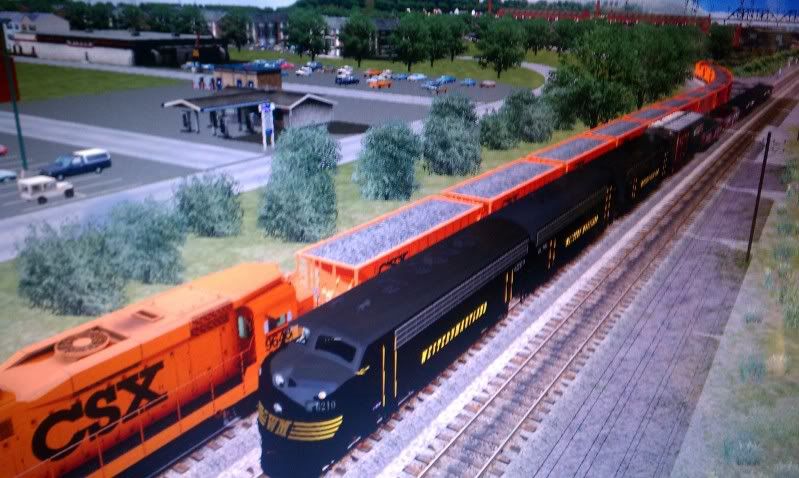
Thanks for the tips. Here is a crappy screen cap of the basic speed lettering version. Still have alot to go but for my first loco I am pleased. Marc can I use the templates in Gimp since it's set up for paint shop?
-
Shayfan1 - Posts: 174
- Joined: Sun Apr 17, 2011 2:39 am
- Location: Mountaineer Country, WV
5 posts
• Page 1 of 1
Return to Rolling-Stock Design
Who is online
Users browsing this forum: No registered users and 3 guests