B&O Lake Subdivision

Discussion about RailWorks route design.

B&O Lake Subdivision

Unread postby MontanaRails » Thu Dec 01, 2011 8:21 pm

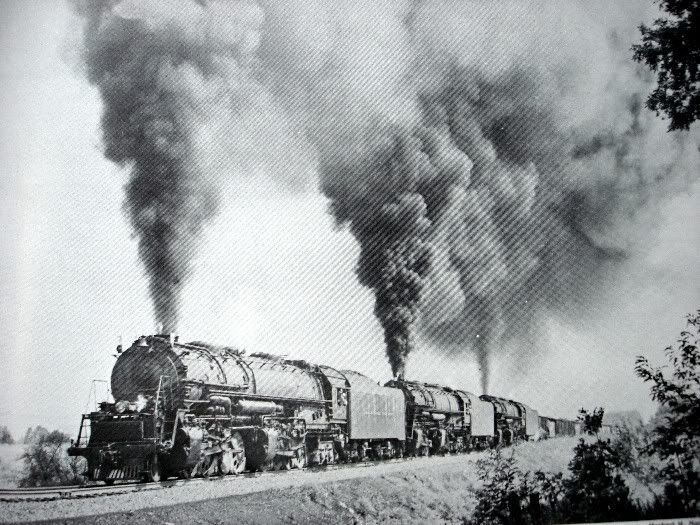
I lived a few years in Middlefield, Ohio, so the B&O subdivision has always held my interest. For those who dont know, it was the last stomping ground for the massive EM-1's (4-8-8-2) and saw very heavy coal trains between Fairport Harbor, and Warren, Ohio. Here are a few links and pictures. I have many more in paper format.

If I knew anything about route design, I'd attempt this line.

http://www.abandonedrails.com/Fairport_Branch

http://www.rypn.org/forums/viewtopic.ph ... 0&p=103539

http://railroad.net/forums/viewtopic.php?f=125&t=53319

Topo map, starting at Warren, Ohio (follow it northwest to the lake):

http://www.topoquest.com/map.php?lat=41 ... min&size=l

In this video, at the 2:00 mark, theres an EM-1 (the helper loco) running backward through downtown Middlefield (probably mid 1950s)

http://www.youtube.com/watch?v=iwsEYgHX6Og

Image

Image

Image

Image

Image

Anyone else know about this line? Or have an interest in it?
Last edited by MontanaRails on Tue Jan 03, 2012 8:52 pm, edited 1 time in total.
Image
MontanaRails
 
Posts: 667
Joined: Sun Nov 14, 2010 2:08 am

Re: B&O Lake Subdivision - idea

Unread postby imnew » Sat Dec 03, 2011 3:31 am

That route would look awesome in RW. Thanks for the links . Wish I could travel back in time and stand trackside when those triple headers went by . Massive steam engines ! Love em !

Why not take the time to learn route building ? It's not that hard really, once you get started its hard to stop. I've been hooked on the route editor for well over two years. There are many YouTube videos on how to use the route editor.

The only problem with route building is time, not enough time to do em all. *!!wink!!*
Intel Core I7-7770K, ZOTAC GTX 1080 Ti AMP
Extreme, ASUS ROG Strix Z270H, 16 GB HyperX Fury DDR4, Samsung 850 EVO 500GB, Corsair Force MP500 240GB M.2, 34" Ultra Wide Samsung Monitor
User avatar
imnew
 
Posts: 2456
Joined: Tue Aug 25, 2009 1:41 pm

Re: B&O Lake Subdivision - idea

Unread postby MontanaRails » Tue Dec 06, 2011 4:18 pm

I would actually love to try to do this myself...I just cant at the current time. I only have a couple hours here or there...which would be fine if I knew what I was doing. The problem is I expect I'll need quite a bit of time to figure out the process of route building. I found a few guides at various sites but havent had time to digest it.
Image
MontanaRails
 
Posts: 667
Joined: Sun Nov 14, 2010 2:08 am

Re: B&O Lake Subdivision - idea

Unread postby RAILSOHIO » Wed Dec 07, 2011 11:02 pm

One great thing about Ohio is that 1/9 arc second (the highest resolution) data is available for the whole state. There is a great tutorial on how to get 1 arc second dem into Railworks. A new route builder can follow it without too much trouble. As for me,I am starting over on my DT&I,C&O/B&O/N&W route,as my 2 months worth of work completely disappeared in a lockup. I just registered ReDem,so I can use the higher resolution data,this time.
User avatar
RAILSOHIO
 
Posts: 664
Joined: Thu Jun 23, 2011 11:35 am
Location: Little Hocking,Ohio

Re: B&O Lake Subdivision - idea

Unread postby MontanaRails » Sat Dec 10, 2011 7:43 pm

RAILSOHIO wrote:One great thing about Ohio is that 1/9 arc second (the highest resolution) data is available for the whole state. There is a great tutorial on how to get 1 arc second dem into Railworks. A new route builder can follow it without too much trouble. As for me,I am starting over on my DT&I,C&O/B&O/N&W route,as my 2 months worth of work completely disappeared in a lockup. I just registered ReDem,so I can use the higher resolution data,this time.


What are the best sites, in your opinion, which explain the process?
Image
MontanaRails
 
Posts: 667
Joined: Sun Nov 14, 2010 2:08 am

Re: B&O Lake Subdivision - idea

Unread postby MontanaRails » Sat Dec 10, 2011 9:51 pm

So I've been following the PDF manual by imnew, thread here: viewtopic.php?f=7&t=3446&start=15

And I get to the point where I am using BILxSRTM to convert the BIL data to SRTM. However, no matter what settings I chose, it doesnt work. It says "Done", but when I go to the output folder, there's nothing there. I've run BILxSRTM in compatiblity mode, and as an administrator, and it makes no difference. I'd like to use this program - I would rather not pay for ReDem.

Anyone have any ideas? I googled the problem I'm having and didnt come up with anything helpful.
Image
MontanaRails
 
Posts: 667
Joined: Sun Nov 14, 2010 2:08 am

Re: B&O Lake Subdivision - idea

Unread postby glenn68 » Sat Dec 10, 2011 10:46 pm

I think that this area is a good idea for a route. For the past 4 years I have been into train sims and always see routes based on popular cities or subdivisions. As for a B&O subdivisions, I always pondered on the Wheeling and Pittsburgh sub from Wheeling West Virgina to Pittsburgh Pa. Yes I grew up close by but towns like Wheeling Wv. , Washington Pa and Finleyville Pa adds a home town feel and the rail line meanders through some nice scenery.
User avatar
glenn68
 
Posts: 967
Joined: Mon Aug 09, 2010 1:21 pm

Re: B&O Lake Subdivision - idea

Unread postby Chessie8638 » Sun Dec 11, 2011 3:18 am

Interesting info. Have to look more into this line. I'm more familiar with the B&O west of Willard.
Chessie8638
 

Re: B&O Lake Subdivision - idea

Unread postby NDORFN » Sun Dec 11, 2011 4:05 am

MontanaRails wrote:So I've been following the PDF manual by imnew, thread here: viewtopic.php?f=7&t=3446&start=15

And I get to the point where I am using BILxSRTM to convert the BIL data to SRTM. However, no matter what settings I chose, it doesnt work. It says "Done", but when I go to the output folder, there's nothing there. I've run BILxSRTM in compatiblity mode, and as an administrator, and it makes no difference. I'd like to use this program - I would rather not pay for ReDem.

Anyone have any ideas? I googled the problem I'm having and didnt come up with anything helpful.


ReDem is only seven bucks and totally worth it. I wasn't going to buy it but struggled with every alternative until I finally caved... no regrets here. I got RW_Decal too, also totally worth it. Everything is step-by-step so you can go from zero to having a new route with highly accurate terrain and photo decals to help with placements in about 3 hours (2.5 hours for me was waiting for RW-Decals to go through it's automated process of generating decals).
NDORFN
 
Posts: 1231
Joined: Mon Nov 28, 2011 8:12 pm
Location: Matamata, New Zealand

Re: B&O Lake Subdivision - idea

Unread postby imnew » Wed Dec 14, 2011 6:30 am

Montanarails,

I posted a reply to your question regarding rwdecal markers last night. Seems your post as well as my answer has been lost due to the server problems Hawk announced.

Here we go: I seem to recall that you got the RWDecals to actually show up in the world editor, but not the markers aka " where to put the RWDecals"

Not sure if this helps, but remember to, first import your terrain, then activate the markers button, see pic... Then press F6 so that where to put the markers show up.. Be sure that you are where you are suppose to be in the compass. If the markers do not show up, then save progress, press the "play" button in the lower right hand corner, then press "escape", select world editor. If you are where your markers coordinates are suppose to be, then the markers should be visible .

Hope this helps.

Good luck
Imnew ( creator of the tutorial you mentioned ) *!!wink!!*
You do not have the required permissions to view the files attached to this post.
Intel Core I7-7770K, ZOTAC GTX 1080 Ti AMP
Extreme, ASUS ROG Strix Z270H, 16 GB HyperX Fury DDR4, Samsung 850 EVO 500GB, Corsair Force MP500 240GB M.2, 34" Ultra Wide Samsung Monitor
User avatar
imnew
 
Posts: 2456
Joined: Tue Aug 25, 2009 1:41 pm

Re: B&O Lake Subdivision - idea

Unread postby MontanaRails » Wed Dec 14, 2011 11:31 am

imnew wrote:Montanarails,

I posted a reply to your question regarding rwdecal markers last night. Seems your post as well as my answer has been lost due to the server problems Hawk announced.

Here we go: I seem to recall that you got the RWDecals to actually show up in the world editor, but not the markers aka " where to put the RWDecals"

Not sure if this helps, but remember to, first import your terrain, then activate the markers button, see pic... Then press F6 so that where to put the markers show up.. Be sure that you are where you are suppose to be in the compass. If the markers do not show up, then save progress, press the "play" button in the lower right hand corner, then press "escape", select world editor. If you are where your markers coordinates are suppose to be, then the markers should be visible .

Hope this helps.

Good luck
Imnew ( creator of the tutorial you mentioned ) *!!wink!!*


Thank you, I actually did realize that I didnt have that button checked... !DUH!

But, I dont think I imported the terrain correctly. When I would first enter the route for editing, I could see terrain. However, once I'd fly to the first marker location, it would be on a radically different tile, and the whole world is flat again, for miles and miles....So it seems the terrain DEM either didnt get loaded correctly, or got loaded at the wrong coordinates (which I cant understand; I double checked every lat/long I typed in for correctness). I went back through the manual you made a few times to double check, and I'm pretty sure I did everything in order.

So... I just deleted the entire route and markers and everything, ordered ReDem, and will try that program.

Question about ReDem ordering; how long does it normally take to get a key? I ordered it several days ago, and all I have is the PayPal confirmation. I also noticed yesterday and today, the zugware site will not load. All I get is a continuous loading bar and a blank page that says this "Database Error: Unable to connect to the database:Could not connect to MySQL"

Edit: I just noticed that the only part of the site that loads reliably is the forum...and it looks like its been abandoned for years, full of spam. Other pages, like the ordering page, work sometimes.

Maybe I just dropped $7 into a hole never to be seen again...
Image
MontanaRails
 
Posts: 667
Joined: Sun Nov 14, 2010 2:08 am

Re: B&O Lake Subdivision - idea

Unread postby imnew » Wed Dec 14, 2011 2:29 pm

*!sad!* , cant imagine what went wrong. I`m sorry i cannot be of more help. Hope you have better luck with ReDem.
Intel Core I7-7770K, ZOTAC GTX 1080 Ti AMP
Extreme, ASUS ROG Strix Z270H, 16 GB HyperX Fury DDR4, Samsung 850 EVO 500GB, Corsair Force MP500 240GB M.2, 34" Ultra Wide Samsung Monitor
User avatar
imnew
 
Posts: 2456
Joined: Tue Aug 25, 2009 1:41 pm

Re: B&O Lake Subdivision - idea

Unread postby MontanaRails » Wed Dec 14, 2011 4:38 pm

Here's a question - when I download the terrain .bil files from the seamless server, I get two downloads. How are these installed? When they're converted into SRTM, do both files go in the DEM folder? And I 'load' each at the same time in Railworks editor? Or do I copy one over, load it, and then copy the next over, and load it in the editor?
Image
MontanaRails
 
Posts: 667
Joined: Sun Nov 14, 2010 2:08 am

Re: B&O Lake Subdivision - idea

Unread postby MontanaRails » Wed Dec 14, 2011 7:40 pm

Nevermind! Im crankin' away on this now!

I got my ReDem code, and after about two hours of playing around with tutorials and manuals, I've got my marker files, and 1/9 arc sec terrain successfully imported into my route, it all matches up, looks awesome! This is going to be a challenge with big coal trains through the Swine Creek curvature and gradients, I can already tell...

Next step...figuring out the decals. Gonna back it up first though!
Image
MontanaRails
 
Posts: 667
Joined: Sun Nov 14, 2010 2:08 am

Re: B&O Lake Subdivision - idea

Unread postby imnew » Thu Dec 15, 2011 7:35 am

MontanaRails wrote:Nevermind! Im crankin' away on this now!

I got my ReDem code, and after about two hours of playing around with tutorials and manuals, I've got my marker files, and 1/9 arc sec terrain successfully imported into my route, it all matches up, looks awesome! This is going to be a challenge with big coal trains through the Swine Creek curvature and gradients, I can already tell...

Next step...figuring out the decals. Gonna back it up first though!


Excellent news Montanarails. !!*ok*!! One more railfan hooked on route building :-)
Intel Core I7-7770K, ZOTAC GTX 1080 Ti AMP
Extreme, ASUS ROG Strix Z270H, 16 GB HyperX Fury DDR4, Samsung 850 EVO 500GB, Corsair Force MP500 240GB M.2, 34" Ultra Wide Samsung Monitor
User avatar
imnew
 
Posts: 2456
Joined: Tue Aug 25, 2009 1:41 pm

Next

Return to Route Design

Who is online

Users browsing this forum: No registered users and 31 guests