Page 1 of 1

Smoothing out Jagged Edges

Unread postPosted: Wed Sep 21, 2011 9:10 pm
by Shortliner
So, I've been working on smoothing out the jagged edge of the cliffs of my route. However what ends up happening is that I use the smooth tool, and then I'd have to use the "snap to track" tool to bring the terrain back to the tracks, and the jagged edges would return. Does anyone have any hints or tricks in smoothing out the jagged edges?
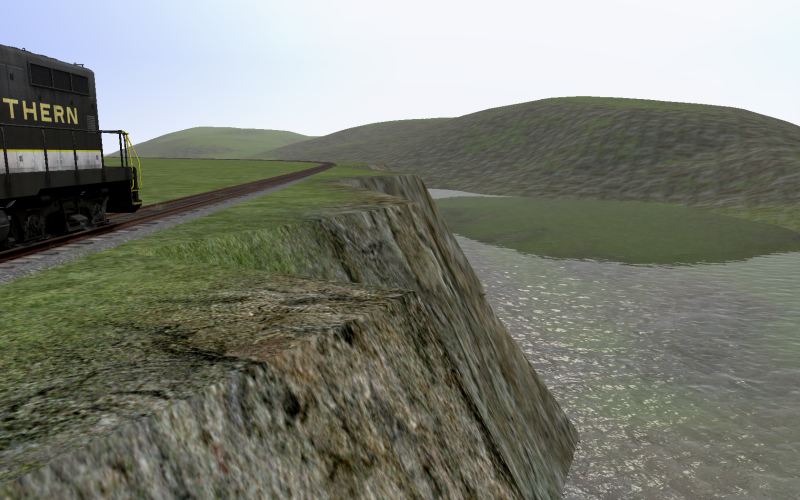
Image

Re: Smoothing out Jagged Edges

Unread postPosted: Wed Sep 21, 2011 11:19 pm
by Toripony
Set Brush Width to 10.0, Brush Falloff to 0.3 to 0.5 and same for Speed, then adjust each point individually. The smoothing technique you're trying will work on lesser slopes but for the slope you show in the pic, one-at-a-time is your best (but slowest) bet. Lower the point to 45-60 degrees and raise up the notch between points and you'll get an overall reasonable slope that will look fine with foliage.

Re: Smoothing out Jagged Edges

Unread postPosted: Thu Sep 22, 2011 6:44 am
by Bananarama
Yep - I do the same as Tori. Best results, albeit at a tedious pace.

Re: Smoothing out Jagged Edges

Unread postPosted: Thu Sep 22, 2011 9:44 am
by PapaXpress
Thanks Tori, I've been looking for this too.