
Hey all,
So I was wondering if this was possible...
I am planning on taking existing structures on my route from one of the routes I'm using and re-texturing them. Now, I know that TS Workshop requires you to use Assets available on the TS marketplace, but does that mean that I can't use assets I've modified and added to my own asset folder within my route? Or, am I stuck with using the "stock" assets. I would like to wait on responses before I unnecessarily do a lot of work.
Thanks,
Ken
Using Custom/Own Assets in TrainSim Workshop
First unread post • 12 posts
• Page 1 of 1
Using Custom/Own Assets in TrainSim Workshop
 by xxuntitledxx » Sun Oct 29, 2017 8:36 pm
- xxuntitledxx
- Posts: 428
- Joined: Tue Jun 25, 2013 5:02 pm
- Location: NJ
Re: Using Custom/Own Assets in TrainSim Workshop
by jpetersjr » Sun Oct 29, 2017 8:51 pm
Yes, sadly you won't be able to use assets you've modified on the workshop.
Jonathan Burton Peters Jr, Big J
The Legend Of The New York Central System Shall Live Again In TS2021.
Website
https://jpetersjr1.wixsite.com/big-j-productions
3D Freeware Scenery Developer Since 2011
The Legend Of The New York Central System Shall Live Again In TS2021.
Website
https://jpetersjr1.wixsite.com/big-j-productions
3D Freeware Scenery Developer Since 2011
-

jpetersjr - Posts: 4010
- Joined: Tue Apr 26, 2011 6:31 pm
- Location: Mobile, Alabama, United States,
Re: Using Custom/Own Assets in TrainSim Workshop
by xxuntitledxx » Mon Oct 30, 2017 4:31 pm
Darn, well...at least I knew that ahead of time... I might release two versions, or just eliminate the whole steam workshop idea anyway?
Any suggestions?
Any suggestions?
- xxuntitledxx
- Posts: 428
- Joined: Tue Jun 25, 2013 5:02 pm
- Location: NJ
Re: Using Custom/Own Assets in TrainSim Workshop
by buzz456 » Mon Oct 30, 2017 5:33 pm
I use the Steam workshop but here would be preferred if it would make the route better. We have a ton of custom assets in the MRL so it will be here not there. Just my 
Buzz
39 and holding.
"Some people find fault like there's a reward for it."- Zig Ziglar
"If you can dream it you can do it."- Walt Disney

39 and holding.
"Some people find fault like there's a reward for it."- Zig Ziglar
"If you can dream it you can do it."- Walt Disney
-

buzz456 - Site Admin
- Posts: 21174
- Joined: Sun Mar 21, 2010 8:30 am
- Location: SW Florida
Re: Using Custom/Own Assets in TrainSim Workshop
by Chacal » Tue Oct 31, 2017 2:20 pm
I'm not clear on what you want to do exactly.
Over the hill and gathering speed
- Chacal
- Site Admin
- Posts: 6563
- Joined: Tue Jul 05, 2011 1:11 pm
- Location: Quebec, Canada
Re: Using Custom/Own Assets in TrainSim Workshop
by buzz456 » Tue Oct 31, 2017 2:34 pm
What part don't you understand?
Buzz
39 and holding.
"Some people find fault like there's a reward for it."- Zig Ziglar
"If you can dream it you can do it."- Walt Disney
39 and holding.
"Some people find fault like there's a reward for it."- Zig Ziglar
"If you can dream it you can do it."- Walt Disney
-
buzz456 - Site Admin
- Posts: 21174
- Joined: Sun Mar 21, 2010 8:30 am
- Location: SW Florida
Re: Using Custom/Own Assets in TrainSim Workshop
by ex-railwayman » Tue Oct 31, 2017 3:47 pm
May I suggest to Ken that you forget all about using Marketplace, as it is very restrictive as to what assets can ONLY be used on any route, yes, I accept that it is easy for folks to subscribe and download but, it really isn't any different to going into the library here and obtaining everything, and if you ignore Steam completely, you can build any layout utilising ANY assets from ANY route that YOU want, as it is your creation, we have thousands of freeware assets at our disposal nowadays and if folks don't have all the required DLC routes with assets attached, then they'll have to wait until there is a Sale on Steam, which are fairly regularly throughout the year, and we can buy any route that we haven't already got for half price, or, so, it's not the end of the world, although for some it sounds as though it is, and folks are probably too lazy in having to go outside of their little bubble to do things that give us all the same end result.
Cheerz. Steve.
Cheerz. Steve.
i7 10700k 3.8GHz Eight Core CPU, Gigabyte Z590 AORUS ELITE AX, 32GB RAM, nVidia RTX3060ti 8GB, WIN10 PRO 64-bit. 10TB HDDs in total.
- ex-railwayman
- Posts: 1203
- Joined: Tue Jun 22, 2010 6:17 pm
- Location: Nottingham, England
Re: Using Custom/Own Assets in TrainSim Workshop
by Chacal » Tue Oct 31, 2017 10:47 pm
buzz456 wrote:What part don't you understand?
This is incomprehensible to me:
I am planning on taking existing structures on my route from one of the routes I'm using and re-texturing them.
What is "my route" and what are "routes I'm using"?
And this too:
Now, I know that TS Workshop requires you to use Assets available on the TS marketplace, but does that mean that I can't use assets I've modified and added to my own asset folder within my route?
Over the hill and gathering speed
- Chacal
- Site Admin
- Posts: 6563
- Joined: Tue Jul 05, 2011 1:11 pm
- Location: Quebec, Canada
Re: Using Custom/Own Assets in TrainSim Workshop
by GreatNortherner » Wed Nov 01, 2017 5:36 am
And this too:
Using repaints of a Steam DLC in Workshop: yes, this is possible. Using assets from your own (or any other 3rd party, on-Steam-DLC, assets folder: no, there is no way this will work.
Part of what has been said before isn't 100% correct. An upload to the Steam Train Sim Workshop will only be accepted as long as it only uses assets that are found in one of the official Steam DLCs. Any loco, route, or Marketplace add-on seems to be valid for this. However, as far as I have been able to figure out, the uploader in TS only checks for the provider/product folder names of your route or scenario before uploading, not for all the actual assets (blueprints) that are in use. Which is why you can actually use repaints in your projects, but they need to be repaints of the content from the official DLC. Also, note that it is impossible to upload any files from the Assets folder to the Workshop, so you will need to supply external links to these repaints in the description. Have a look at many of the UK routes scenarios in the Workshop, using repaints is quite common there.
Hope this helps a bit.
Cheers
Michael
[/quote]Now, I know that TS Workshop requires you to use Assets available on the TS marketplace, but does that mean that I can't use assets I've modified and added to my own asset folder within my route?
Using repaints of a Steam DLC in Workshop: yes, this is possible. Using assets from your own (or any other 3rd party, on-Steam-DLC, assets folder: no, there is no way this will work.
Part of what has been said before isn't 100% correct. An upload to the Steam Train Sim Workshop will only be accepted as long as it only uses assets that are found in one of the official Steam DLCs. Any loco, route, or Marketplace add-on seems to be valid for this. However, as far as I have been able to figure out, the uploader in TS only checks for the provider/product folder names of your route or scenario before uploading, not for all the actual assets (blueprints) that are in use. Which is why you can actually use repaints in your projects, but they need to be repaints of the content from the official DLC. Also, note that it is impossible to upload any files from the Assets folder to the Workshop, so you will need to supply external links to these repaints in the description. Have a look at many of the UK routes scenarios in the Workshop, using repaints is quite common there.
Hope this helps a bit.
Cheers
Michael
-

GreatNortherner - Posts: 1593
- Joined: Sun Feb 15, 2009 11:19 am
- Location: Czech Republic
Re: Using Custom/Own Assets in TrainSim Workshop
by xxuntitledxx » Thu Nov 02, 2017 9:27 pm
I was only going to use the Workshop because I thought it would be easier to distribute that way. I originally was planning on releasing it here only. But then the Workshop was introduced *cue angels singing* and I thought it would be better to do it that way. I am really trying to make it easy for all people to get it so I'm guessing any way that's easy (and suitable for what I want to do) is the way to go.
With that being said, to answer Chacal's question:
I was trying to create my own Signal Boxes with locations on them (like how Stevens Pass has) but for things on Conrail like Bound Brook, Newark, RON, Etc. Even some control Points on NS have names on the boxes (i.e. Sully).
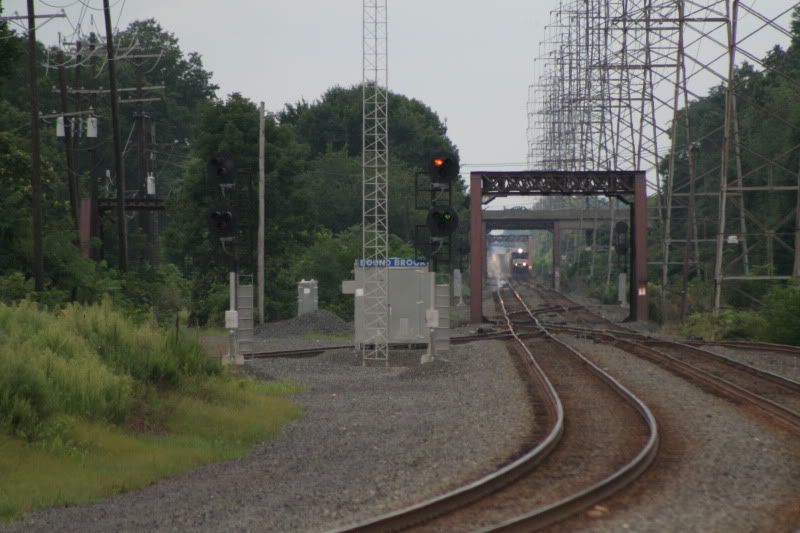

I was going to use signal boxes from Steven's Pass or the NJCL route. Still can't figure out an easy way to do it (any help would be appreciated).
And, I'm also running into a pickle with the Steel Stacks (and the Sands casino) in Bethlehem, can't find any routes with assets good enough to be stand-ins for them. So, in the long run I might end up just releasing it here since I'll need some "custom" assets. If anyone wants to help with the stacks, I'll gladly take it and you will be noted in he release notes as a contributor.
Ken
With that being said, to answer Chacal's question:
Chacal wrote:I'm not clear on what you want to do exactly.
I was trying to create my own Signal Boxes with locations on them (like how Stevens Pass has) but for things on Conrail like Bound Brook, Newark, RON, Etc. Even some control Points on NS have names on the boxes (i.e. Sully).
I was going to use signal boxes from Steven's Pass or the NJCL route. Still can't figure out an easy way to do it (any help would be appreciated).
And, I'm also running into a pickle with the Steel Stacks (and the Sands casino) in Bethlehem, can't find any routes with assets good enough to be stand-ins for them. So, in the long run I might end up just releasing it here since I'll need some "custom" assets. If anyone wants to help with the stacks, I'll gladly take it and you will be noted in he release notes as a contributor.
Ken
- xxuntitledxx
- Posts: 428
- Joined: Tue Jun 25, 2013 5:02 pm
- Location: NJ
Re: Using Custom/Own Assets in TrainSim Workshop
by ET44C4 » Fri Nov 03, 2017 10:16 am
Use the Stevens Pass relay box. Now find a sign asset like the ones included in the Sherman Hill route and repaint them. When placing the sign, hide the post so the name only shows on the relay box.

**Not taking any requests**
Santa Fe All The Way
Nothing Runs Like a Deere
No Farms No Food
Ford Powerstroke
My 87 Ford: https://www.youtube.com/channel/UCvNRba ... _tNs53k42w
Santa Fe All The Way
Nothing Runs Like a Deere
No Farms No Food
Ford Powerstroke
My 87 Ford: https://www.youtube.com/channel/UCvNRba ... _tNs53k42w
-

ET44C4 - Posts: 3187
- Joined: Mon Aug 22, 2016 12:01 pm
- Location: Clover, South Carolina
Re: Using Custom/Own Assets in TrainSim Workshop
by Chacal » Fri Nov 03, 2017 10:26 am
This, and you could include your repaints of these relay boxes as per GN's post.
Over the hill and gathering speed
- Chacal
- Site Admin
- Posts: 6563
- Joined: Tue Jul 05, 2011 1:11 pm
- Location: Quebec, Canada
12 posts
• Page 1 of 1
Who is online
Users browsing this forum: No registered users and 5 guests