
Screen Shots...
First unread post • 7 posts
• Page 1 of 1
Screen Shots...
 by steamman » Fri Sep 14, 2012 1:07 am
This is going to seem like a dumb question I think, and I'm probably missing the obvious. But I've never had any need or desire to take a screen shot in RW until now, and I'm a little befuddled. Now since Win 7 has no clipboard viewer, so 'print screen or 'shift-print screen' doesn't do anything, or so it would appear... And I couldn't see anything in the docs, I probably missed it knowing me... How are you guys taking screen shots?, or is RW taking it and putting it in some folder I don't know about?? Thanks.
- steamman
- Posts: 25
- Joined: Wed Dec 08, 2010 5:41 pm
Re: Screen Shots...
by steamman » Fri Sep 14, 2012 1:16 am
Never mind... I just woke up, and see the "adding images to a post" (above)  .. I'll try some of that and see how I make out...
.. I'll try some of that and see how I make out...- steamman
- Posts: 25
- Joined: Wed Dec 08, 2010 5:41 pm
Re: Screen Shots...
by Marleyman » Fri Sep 14, 2012 4:25 am
I use the Windows 7 'Snipping Tool' for static images. I openTS2012 in a window then;
To capture a snip
Open Snipping Tool by clicking the Start button . In the search box, type Snipping Tool, and then, in the list of results, click Snipping Tool.
Click the arrow next to the New button, select Free-form Snip, Rectangular Snip, Window Snip, or Full-screen Snip from the list, and then select the area of your screen that you want to capture.
To save a snip
After you capture a snip, click the Save Snip button in the mark-up window.
In the Save As dialog box, enter a name for the snip, choose a location where to save the snip, and then click Save.
To capture a snip
Open Snipping Tool by clicking the Start button . In the search box, type Snipping Tool, and then, in the list of results, click Snipping Tool.
Click the arrow next to the New button, select Free-form Snip, Rectangular Snip, Window Snip, or Full-screen Snip from the list, and then select the area of your screen that you want to capture.
To save a snip
After you capture a snip, click the Save Snip button in the mark-up window.
In the Save As dialog box, enter a name for the snip, choose a location where to save the snip, and then click Save.
My Railworks 2 Catalogue; http://www.railworks.marleyman.co.uk/
and My RWTS2013 Download Store http://www.railworks.marleyman.co.uk/store/
and My RWTS2013 Download Store http://www.railworks.marleyman.co.uk/store/
-

Marleyman - Posts: 357
- Joined: Fri Dec 10, 2010 4:46 pm
- Location: UK
Re: Screen Shots...
by Chacal » Fri Sep 14, 2012 2:29 pm
RW has a built-in screenshot function.
Just hit Ctrl-S while playing.
The shots are stored in "My pictures"
Just hit Ctrl-S while playing.
The shots are stored in "My pictures"
Over the hill and gathering speed
- Chacal
- Site Admin
- Posts: 6717
- Joined: Tue Jul 05, 2011 1:11 pm
- Location: Quebec, Canada
Re: Screen Shots...
by LoneWolfDon » Sun Sep 16, 2012 6:54 pm
The Steam-Client also has a built-in way to take screen-shots of games you're playing at the time, it's the F12 key by default. Then after you close the game, go to your profile, and you should see a "Screenshots" link you can click on to access & manage them.
If you then click on a picture to enlarge it, you'll see it open up full-size in a new windows, and a url/link along the top you could then copy & paste if you want to post it in a forum perhaps to let others see. Example;
http://cloud.steampowered.com/ugc/54290 ... F60573A7E/
That's a screen-shot on my Steam-profile, taken from my Western Wildwood route.
You may need to have your Steam-profile set to Public though if you want others to be able to see it.
Or, you could upload some of your images to some photo-sharing site, such as make yourself a free account at http://photobucket.com/ , then upload your images, then you can copy & paste the link to your image, example; http://i1231.photobucket.com/albums/ee5 ... HD_032.jpg ,or for some forums (like RWA here), you can put the image-url into the Img code, and have it appear on your post, like this:

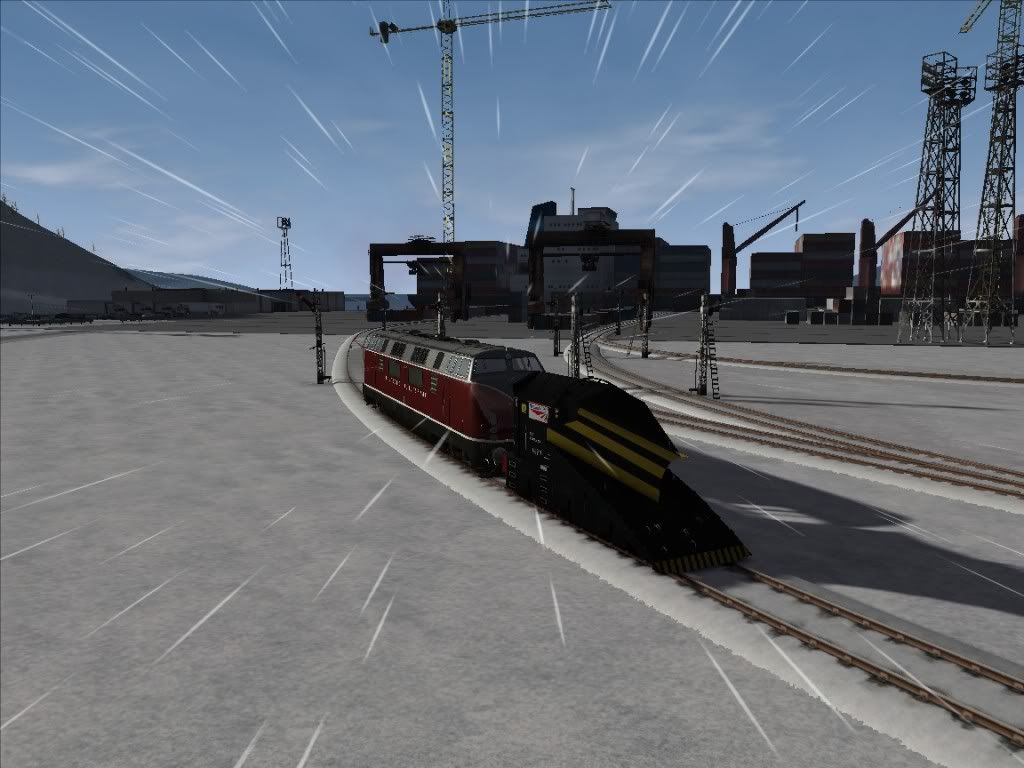
(Screenshots from my King's Arm Highway Deluxe route, http://www.rryard.com/kings_arm_deluxe.html ,at the Shipyard area)
Cheers! :)
If you then click on a picture to enlarge it, you'll see it open up full-size in a new windows, and a url/link along the top you could then copy & paste if you want to post it in a forum perhaps to let others see. Example;
http://cloud.steampowered.com/ugc/54290 ... F60573A7E/
That's a screen-shot on my Steam-profile, taken from my Western Wildwood route.
You may need to have your Steam-profile set to Public though if you want others to be able to see it.
Or, you could upload some of your images to some photo-sharing site, such as make yourself a free account at http://photobucket.com/ , then upload your images, then you can copy & paste the link to your image, example; http://i1231.photobucket.com/albums/ee5 ... HD_032.jpg ,or for some forums (like RWA here), you can put the image-url into the Img code, and have it appear on your post, like this:
(Screenshots from my King's Arm Highway Deluxe route, http://www.rryard.com/kings_arm_deluxe.html ,at the Shipyard area)
Cheers! :)
RailWorks Route & Scenario addons, video tutorials and other resources at http://www.RRYard.com
-
LoneWolfDon - Posts: 279
- Joined: Wed Dec 16, 2009 1:41 am
- Location: Canada
Re: Screen Shots...
by BNSF650 » Sun Sep 16, 2012 7:25 pm
Or you can use FRAPS

New Era of Train Simulation
-

BNSF650 - Posts: 2016
- Joined: Mon May 31, 2010 10:27 pm
- Location: Texas
Re: Screen Shots...
by GSkid » Tue Sep 18, 2012 12:42 am
I just use the one built in. No need to use any other means that I can think of.
I used it to compare the different effects options and quality sliders to see the differences. It convinced me to not use the bloom effects. It bleaches (lightens and whitens) everything to the point that it looks more unnatural compared to with it off. I suppose it''s a nice effect to have if you like that. But honestly my Laptop can handle TSX-ON and all filters and effects on max with no problems. Only on Donner Pass does it start to tax it at max settings and even then the frame rate is very tolerable. So no need to lower the settings.
I am going to take some shots to see if there is any noticeable difference between 2012 and the new 2013 other than a higher frame rate.
I used it to compare the different effects options and quality sliders to see the differences. It convinced me to not use the bloom effects. It bleaches (lightens and whitens) everything to the point that it looks more unnatural compared to with it off. I suppose it''s a nice effect to have if you like that. But honestly my Laptop can handle TSX-ON and all filters and effects on max with no problems. Only on Donner Pass does it start to tax it at max settings and even then the frame rate is very tolerable. So no need to lower the settings.
I am going to take some shots to see if there is any noticeable difference between 2012 and the new 2013 other than a higher frame rate.
EMD 2-strokes rule! My all time favorite: SD45X also love the SD40-2/SD40T-2/SD45-2/SD45T-2/DD35A/DDA40X/SD70ACe/SD80ACe
Southern Pacific RR! Bloody nose/Serif lettering - Donner Pass/Tehachapi Pass/Cajon Pass/UP Coast Line
i7-11800H // RTX 3070 // 16GB DDR4 // 2TB SSD // 16” 165Hz WQXGA 16:10 w/G-Sync // TS Classic // TSW5 // Run 8 V3
Southern Pacific RR! Bloody nose/Serif lettering - Donner Pass/Tehachapi Pass/Cajon Pass/UP Coast Line
i7-11800H // RTX 3070 // 16GB DDR4 // 2TB SSD // 16” 165Hz WQXGA 16:10 w/G-Sync // TS Classic // TSW5 // Run 8 V3
-

GSkid - Posts: 1197
- Joined: Fri Sep 07, 2012 2:17 am
- Location: UP's Santa Barbara subdivision - USA
7 posts
• Page 1 of 1
Who is online
Users browsing this forum: No registered users and 38 guests