
Signalling Question
First unread post • 3 posts
• Page 1 of 1
Signalling Question
 by emdsd90mac » Sun Nov 13, 2011 7:15 pm
Recently, I had to delete my entire route and start all over, which kinda made me a little upset, but has given me the opportunity to make a few changes. My route is going to contain a 3 main diverging junction to 3 other mains and I am wondering which signals to use. The #3 main has proven to be the easiest one so far, but the other 2 are challenging me. Due to the fact they cross the other tracks, how do I go about making this work correctly? I can get them to all change to green, but if the #1 main is to diverge, shouldn't #2 and #3 turn red? Not sure if I am painting a good enough picture here, so later on I will include a screen shot with some text. I have fiddled with it for a bit and keep coming up empty.
“The human brain is like a railroad freight car -- guaranteed to have a certain capacity but often running empty.”
-

emdsd90mac - Posts: 557
- Joined: Sat Nov 06, 2010 11:53 am
- Location: Reno, NV
Re: Signalling Question
by GreatNortherner » Mon Nov 14, 2011 8:04 am
Hi,
The phenomenon you describe sounds like it's probably caused by a faulty signal linking.
Most likely it's either because of an unprotected exit, or a signal link not extending beyond the link of the opposing direction's signal. Please see this little sketch for an illustration:
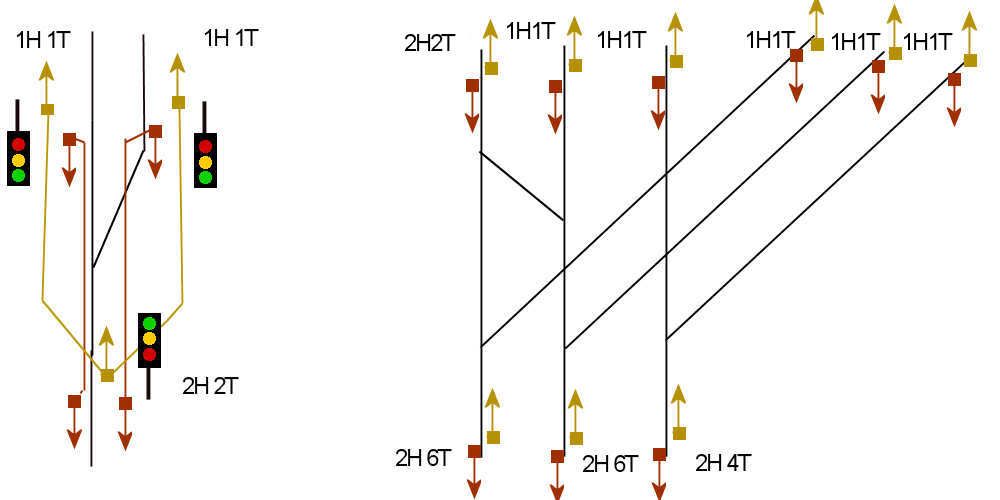
On the left is the simplest junction you can do in RW. The yellow links belong to the junction signal, tpyically a 2H2T (2H2T1E if the siding is a yard lead or dead end). Link 0 is at the signal base, link 1 on the main, link 2 on the diverging track. The two siding exit signals are 1H1T, their links are colored red in this example.
On the right is what I think your junction looks like. I left out the lines between the links as this would have looked mighty confusing, but generally what you do is count the number of possible paths from each signal (which is six on the left and middle "up" track, four on the right-hand track) then place a signal with the appropriate number of track links. Always protect all possible exits of a junction, use the "E" links for yard leads and dead-end tracks. And most crucially, the siding links of each signal need to be dragged past the base (zero) link of the signals on the other side of the junction! If the link is in the middle of the crossover you can get all sorts of strange signal errors.
For the signals on the top of the right-hand side example I assumed that there aren't any slip switches in this scenario, if there were any you would have to use higher link numbers.
BTW: The number of Heads on the signal doesn't actually matter for how the signals work, this is only for visual purposes. In other words: a hypothetical 1H6T3E signal will do the same as a 3H6T3E signal in terms of gameplay and signal logic.
Hope this makes any sense.
Cheers,
Michael
The phenomenon you describe sounds like it's probably caused by a faulty signal linking.
Most likely it's either because of an unprotected exit, or a signal link not extending beyond the link of the opposing direction's signal. Please see this little sketch for an illustration:
On the left is the simplest junction you can do in RW. The yellow links belong to the junction signal, tpyically a 2H2T (2H2T1E if the siding is a yard lead or dead end). Link 0 is at the signal base, link 1 on the main, link 2 on the diverging track. The two siding exit signals are 1H1T, their links are colored red in this example.
On the right is what I think your junction looks like. I left out the lines between the links as this would have looked mighty confusing, but generally what you do is count the number of possible paths from each signal (which is six on the left and middle "up" track, four on the right-hand track) then place a signal with the appropriate number of track links. Always protect all possible exits of a junction, use the "E" links for yard leads and dead-end tracks. And most crucially, the siding links of each signal need to be dragged past the base (zero) link of the signals on the other side of the junction! If the link is in the middle of the crossover you can get all sorts of strange signal errors.
For the signals on the top of the right-hand side example I assumed that there aren't any slip switches in this scenario, if there were any you would have to use higher link numbers.
BTW: The number of Heads on the signal doesn't actually matter for how the signals work, this is only for visual purposes. In other words: a hypothetical 1H6T3E signal will do the same as a 3H6T3E signal in terms of gameplay and signal logic.
Hope this makes any sense.
Cheers,
Michael
-

GreatNortherner - Posts: 1600
- Joined: Sun Feb 15, 2009 11:19 am
- Location: Czech Republic
Re: Signalling Question
by emdsd90mac » Mon Nov 14, 2011 11:30 pm
Wow!! It's all so confusing, but I will have another crack at it. I figured it had something to do with the link placement, so I will fiddle a bit more with it. Thanks for the input, it's greatly appreciated.
“The human brain is like a railroad freight car -- guaranteed to have a certain capacity but often running empty.”
-
emdsd90mac - Posts: 557
- Joined: Sat Nov 06, 2010 11:53 am
- Location: Reno, NV
3 posts
• Page 1 of 1
Who is online
Users browsing this forum: No registered users and 2 guests