Page 1 of 2

Graphics Settings Questions - AA & Flickering & .....

PostPosted: Sat May 04, 2024 7:30 am
by Cardinal51
I think I was kind of hi-jacking gtw5812 his thread, sorry about that. So I started a new one.

AmericanSteam wrote:..... The higher these settings are the more processing resources it takes but the better it looks. ....


GPU power, correct ?

How would one typically notice the setting is too high ?

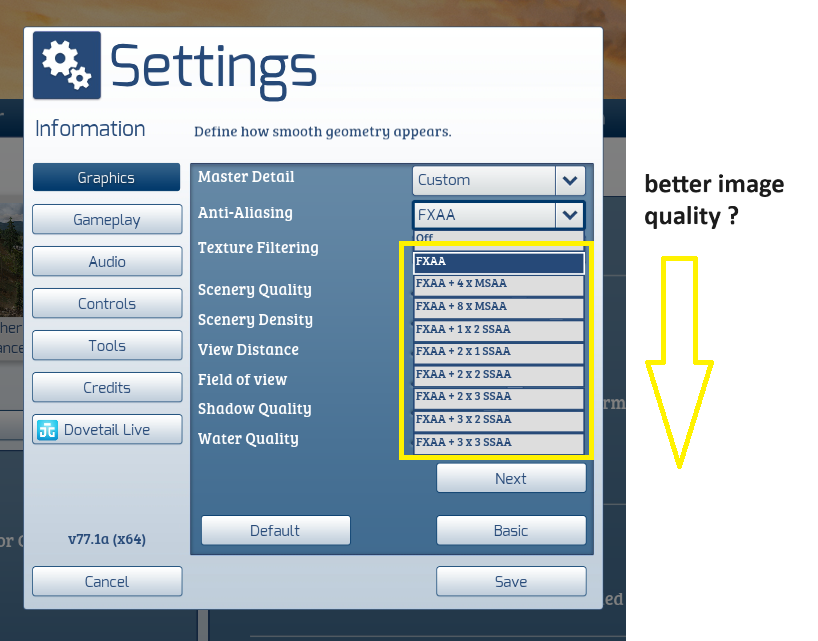
And is the setting from lowest image quality to best image quality ?
Image

AmericanSteam wrote:AA only affects the edges of a curved object. All curved edges are made up of tiny squares anti-aliasing tends to artificially "smooth" these edges into what appears to be a smooth curve or a round object ( e.g hand rails, telephone wires, rounded corners). The higher the anti-aliasing setting (moving down the list) the smoother these curved edges appear, the cost is that more processing power is needed. Depending on your GPU this can be a significant cost in fps. Again it is a balancing act video quality vs performance. Each system configuration is different and you can make changes and see what happens.
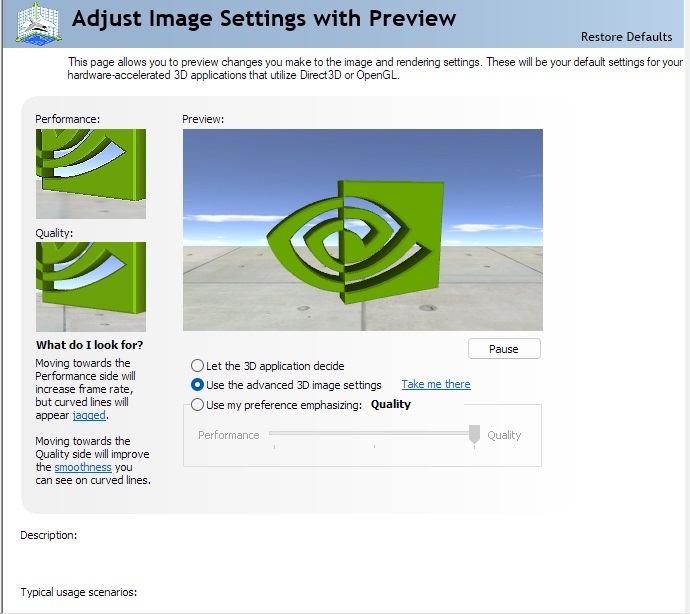
If you open up NVIDIA control panel to Adjust Image Settings With Preview you can see the difference that AA settings make. Look at the left two images.
Do not try to change too many settings at once. Make a change and see what happens, if you don't like the effects, revert back and try something else.
Image


Re: Graphics Settings Questions . . .

PostPosted: Sat May 04, 2024 7:37 am
by Cardinal51
Thanks for all the insight American !

I do not have the Nvidia control panel. Have installed the new Nvidia app.

Below a few more Q for any of you graphics specialists.

- So picking an AA that is too high does not have an effect on the "other work" the GPU has to do, one only notices it in the FPS?

- Is it recommend to set AA in the Nvidia Control Panel as well as in the TSC Settings Menu ?

- I also noticed the option " let the game handle the 3D settings". I always have used that setting. Is that the right thing to do ?

Re: Graphics Settings Questions . . .

PostPosted: Sat May 04, 2024 7:44 am
by Cardinal51
Besides my Q in the above post I am also wondering what causes / how to reduce this flickering . . . .

(12 second movie)

https://1drv.ms/v/s!Aj8hm7Xwo3lygauXR-s ... 8?e=PhINNl

Re: Graphics Settings Questions - AA & Flickering & .....

PostPosted: Sat May 04, 2024 9:37 am
by buzz456
My settings are FXAA + 2 + 2 SSAA and Anisotropic x 8 and I'm getting none of that.

Re: Graphics Settings Questions . . .

PostPosted: Sat May 04, 2024 1:03 pm
by AmericanSteam
Cardinal51 wrote:Thanks for all the insight American !

I do not have the Nvidia control panel. Have installed the new Nvidia app.

Below a few more Q for any of you graphics specialists.

- So picking an AA that is too high does not have an effect on the "other work" the GPU has to do, one only notices it in the FPS?

- Is it recommend to set AA in the Nvidia Control Panel as well as in the TSC Settings Menu ?

- I also noticed the option " let the game handle the 3D settings". I always have used that setting. Is that the right thing to do ?


You still have the traditional NVIDIA control panel. Access to it is in the bottom of the settings page in the new app.
The reduction of frame rates indicates that your GPU is working hard and may be struggling.
In the control panel "let the game handle the 3D settings" Yes means that the in game settings takes precedence over settings in the control panel. No means that the settings in the control panel are primary.
The yes or no keeps form having conflicts between the two. One or the other.
Letting the game handle the 3D settings is the simplest unless you know how the settings work in the control panel.
Try a different AA setting as suggested by buzz. Do this in in-game settings.

Re: Graphics Settings Questions . . .

PostPosted: Sat May 04, 2024 1:42 pm
by Cardinal51
AmericanSteam wrote:You still have the traditional NVIDIA control panel. Access to it is in the bottom of the settings page in the new app.


Nope I didn't , but have reinstalled it via the MS-Store

AmericanSteam wrote:Try a different AA setting as suggested by buzz. Do this in in-game settings.


I did, even removed all NVidia stuff (6 items) and reinstalled, now reinstalling TSC.

Re: Graphics Settings Questions . . .

PostPosted: Sat May 04, 2024 2:15 pm
by AmericanSteam
Cardinal51 wrote:
AmericanSteam wrote:You still have the traditional NVIDIA control panel. Access to it is in the bottom of the settings page in the new app.


Nope I didn't , but have reinstalled it via the MS-Store

AmericanSteam wrote:Try a different AA setting as suggested by buzz. Do this in in-game settings.


I did, even removed all NVidia stuff (6 items) and reinstalled, now reinstalling TSC.

That is pretty drastic to reinstall TSC.

Re: Graphics Settings Questions - AA & Flickering & .....

PostPosted: Sat May 04, 2024 2:19 pm
by Cardinal51
Not at all drastic. 2 clicks, and 1 1/2 hr wait between clicks. *!lol!*

Reason is that the FPS counter in the menus some times reached 700 , and I seem to remember that in the BETA the FPS in menus is locked to a way lower value.

So something is definitely wrong (verifying and redownloading 161 files did have no visible effect) and I decided to reinstall. I doubt it will solve my flickering issue, but it is worth a try.

- - update - my mistake. I did not see that high fps in the menus but in the pre-scenario splash screen.

Re: Graphics Settings Questions - AA & Flickering & .....

PostPosted: Sun May 05, 2024 1:54 am
by Cardinal51
Nope, did not help. I did notice the following....

- Changing the angle (from straight above as in the video) reduces the flickering. Lower angle results.in less visible flickering.
- It does not happen using the Global / Free Camera.
- It does happen using the External Front Camera and External Rear Camera.

Re: Graphics Settings Questions - AA & Flickering & .....

PostPosted: Sun May 05, 2024 6:34 am
by buzz456
Does it do it with all locomotives?

Re: Graphics Settings Questions - AA & Flickering & .....

PostPosted: Sun May 05, 2024 8:01 am
by Cardinal51
I do not know that, but I tried a couple different ones and saw no difference.

Re: Graphics Settings Questions - AA & Flickering & .....

PostPosted: Fri May 17, 2024 2:04 pm
by Cardinal51
Just a bump for my question below . . . .

I am also wondering what causes / how to reduce this flickering . . . .

(12 second movie)

https://1drv.ms/v/s!Aj8hm7Xwo3lygauXR-s ... 8?e=PhINNl

Re: Graphics Settings Questions - AA & Flickering & .....

PostPosted: Fri May 17, 2024 4:52 pm
by jalsina
Cardinal51 wrote:Just a bump for my question below . . . .

I am also wondering what causes / how to reduce this flickering . . . .

(12 second movie)

https://1drv.ms/v/s!Aj8hm7Xwo3lygauXR-s ... 8?e=PhINNl


This has nothing to do with the loco (or the graphiics settings), but some of the scenario textures. The best you can do is ignoring them, unless they flicker all over the route.

Re: Graphics Settings Questions - AA & Flickering & .....

PostPosted: Sat May 18, 2024 12:00 am
by trev123
As said above just ignore them. I run TSC at FXAA + 3 X 3 SSAA and Anisotropic x 8. I still get flickering here and there but don't worry about it. With this setting, Maria Pass runs at about 105 FPS but FRCE is down to about 40 FPS. I don't worry about the Nvidia Control Panel I just have it set at default.

Re: Graphics Settings Questions - AA & Flickering & .....

PostPosted: Sat May 18, 2024 10:06 am
by wacampbell
The flickering in Cardinal51's video is caused by too much camera zoom. Back off the zoom with the mouse scroll wheel and move the camera closer to the object and the flicker will be reduced. Think of it like using a real camera, when you are at maximum zoom camera shake becomes an issue.