Page 1 of 2
Game Graphics Settings

Posted:
Thu May 02, 2024 7:47 pmby gtw5812
Hey Guys,
What would you recommend for game setting to get the optimum picture while operating? My Spec's are Intel Core I7 9700K. It has an NIVIDA GeForce RTX2070 SUPER Graphics card, and my monitor is a Samsung 32" Odyssey with a 165 Hz refresh rate.
Thanks!
Re: Game Graphics Settings
Posted:
Thu May 02, 2024 8:38 pmby AmericanSteam
I would suggest that you add some temperature monitoring software. I use NZXT it is freeware. You can see it on the bottom of the left monitor. Many settings can affect GPU and CPU temperatures. Locking my frame rates at 30fps keeps my GPU temperatures to 50°-60°C at 100 fps it is between 70°-80°C.
Now that you have something substantial you may consider a second monitor. Good used ones can be had for $25.00. They are a great help for editing or transferring files while reskinning. You keep all your desktop on one and your game on the other. I run in extended desktop with the second monitor running on the IGPU. I am sure others will give more information on what works for them.
Re: Game Graphics Settings
Posted:
Thu May 02, 2024 11:18 pmby gtw5812
AmericanSteam wrote:I would suggest that you add some temperature monitoring software. I use NZXT it is freeware. You can see it on the bottom of the left monitor. Many settings can affect GPU and CPU temperatures. Locking my frame rates at 30fps keeps my GPU temperatures to 50°-60°C at 100 fps it is between 70°-80°C.
Now that you have something substantial you may consider a second monitor. Good used ones can be had for $25.00. They are a great help for editing or transferring files while reskinning. You keep all your desktop on one and your game on the other. I run in extended desktop with the second monitor running on the IGPU. I am sure others will give more information on what works for them.
I actual have NZXT, and running at 55-65 on the temps. What do you have your "in game" graphics set at? Thanks.
Re: Game Graphics Settings
Posted:
Fri May 03, 2024 12:28 amby Cardinal51
Nice setup!
A related Q. Is more FPS always better?
Does 70 FPS look better than 60, than 50, than 40, than .....
Re: Game Graphics Settings
Posted:
Fri May 03, 2024 1:28 amby AmericanSteam
I would think in action games the higher the better. In TSC not so much. Would you notice a difference above 60fps? I don't see much difference between 30 and 60. I look to system temperatures when adjusting graphics, and in game settings. It plays smooth with the exception of some minor stuttering when lots of dense scenery is loading.
Re: Game Graphics Settings
Posted:
Fri May 03, 2024 1:29 amby Cardinal51
Why do you look at the temperatures ?
Re: Game Graphics Settings
Posted:
Fri May 03, 2024 1:44 amby AmericanSteam
Cardinal51 wrote:Why do you look at the temperatures ?
CPUs and GPUs have an upper temperature limit before they start to throttle down for self protection. Also the cooler they are the longer they last. You can look up any CPU or GPU for the maximum temperature threshold. I am overclocking MY CPU to 4.6Mhz from a stock 3.6 Mhz so a liquid cooler and temperature monitoring is a must.
Re: Game Graphics Settings
Posted:
Fri May 03, 2024 1:48 amby Cardinal51
I see. Instead of letting the GPU handle the throttle down you do it yourself.
Re: Game Graphics Settings
Posted:
Fri May 03, 2024 1:56 amby AmericanSteam
Cardinal51 wrote:I see. Instead of letting the GPU handle the throttle down you do it yourself.
Yes, by adjusting the settings.
Below are temperatures during a normal TSC session. The temperatures will go up or down depending on CPU and GPU load.
You can PM me for more information on how I set up my system.
Re: Game Graphics Settings
Posted:
Fri May 03, 2024 2:35 amby Cardinal51
I understand. I just let my system handle it. All done by the WIN11 / ASUS / NVIDEA. My system is a simple laptop, works perfectly for me. But have set max FPS to 60, or something like that, just because it was recommended.
Re: Game Graphics Settings
Posted:
Fri May 03, 2024 9:55 amby gtw5812
AmericanSteam wrote:I would think in action games the higher the better. In TSC not so much. Would you notice a difference above 60fps? I don't see much difference between 30 and 60. I look to system temperatures when adjusting graphics, and in game settings. It plays smooth with the exception of some minor stuttering when lots of dense scenery is loading.
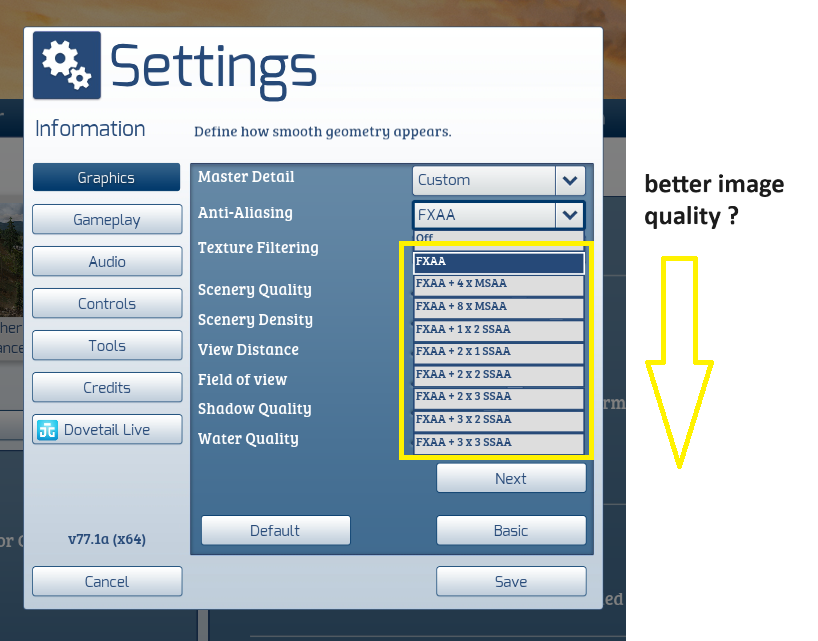
In the 3rd screen shot, what are the 2 settings below "Custom" and what are they for?
Re: Game Graphics Settings
Posted:
Fri May 03, 2024 10:42 amby AmericanSteam
gtw5812 wrote:AmericanSteam wrote:I would think in action games the higher the better. In TSC not so much. Would you notice a difference above 60fps? I don't see much difference between 30 and 60. I look to system temperatures when adjusting graphics, and in game settings. It plays smooth with the exception of some minor stuttering when lots of dense scenery is loading.
In the 3rd screen shot, what are the 2 settings below "Custom" and what are they for?
Explained here:
https://www.digitaltrends.com/computing/what-is-anti-aliasing/ The higher these settings are the more processing resources it takes but the better it looks. I am no expert in any of this, Everything is a compromise and how does it look to you. Remember what it looks to you on your monitor may not be the same as others see it when you post it here.
Re: Game Graphics Settings
Posted:
Fri May 03, 2024 11:29 amby Cardinal51
..... The higher these settings are the more processing resources it takes but the better it looks. ....
GPU power, correct ?
How would one typically notice the setting is too high ?
And is the setting from lowest image quality to best image quality ?
Re: Game Graphics Settings
Posted:
Fri May 03, 2024 12:03 pmby buzz456
I got about halfway down the page and discovered I had a headache coming on.
 https://gaming.stackexchange.com/questi ... mpling-set
Re: Game Graphics Settings
Posted:
Fri May 03, 2024 12:47 pmby buzz456
I know from nothing about the technical details but when I tried to run in MMAA the stuff off in the distance was all shimmery (That's a technical term) and in SSAA the scenery off in the distance was much more stable.