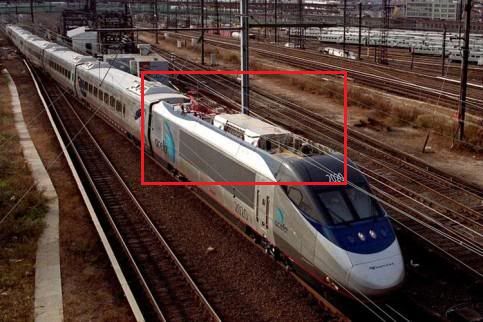
Amtrak Acela

Post your FREEWARE 'Works in Progress' here!

Re: Amtrak Acela

Unread postby micaelcorleone » Tue May 24, 2011 12:35 pm

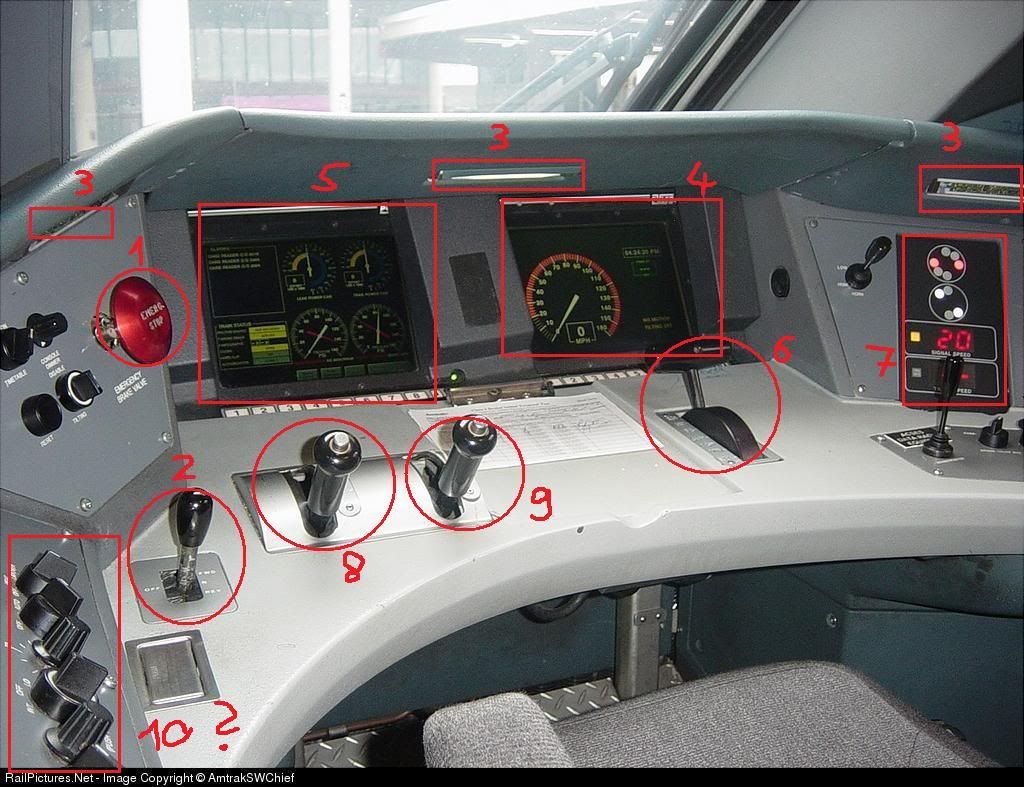
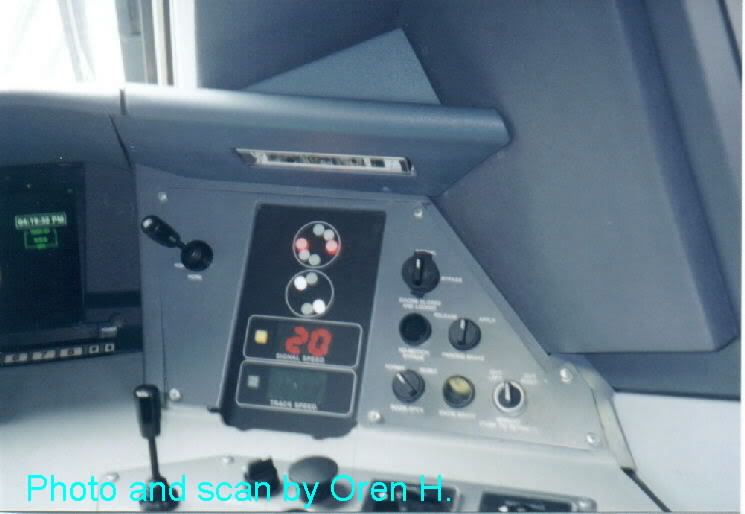
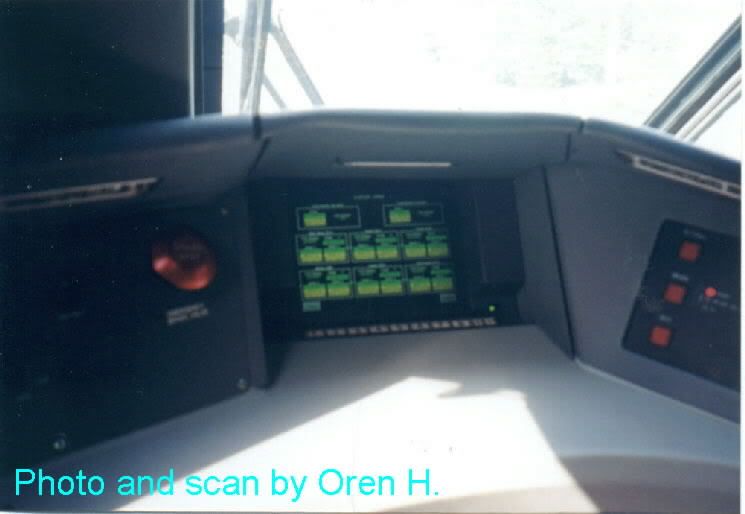
So Reppo, I searched for every cab photo available and made some annotations.

I am no expert and can only guess. So no guarantee for waht I tell you here is right.
The things I'm totally unsure about I'll mention extra with "I guess". *!greengrin!*

Image
1 - Emergency Stop
2 - Reverser (in the picture it is in neutral/off mode)
3 - Lights for the engineer
4 - Speedometer on display, both "clock" and digital (rectangle in the "clock") display
5 - Display for other values: I think current power of head and rear engine on the upper side, the two brake value displays at the bottom
6 - Throttle
7 - NEC Cab Signalling (will this be scripted for the NEC route, ask Railsimulator.com), shows the current signal and speed limit
8/9 - The Brakes. Either the left is the train brake and the right the loco brake or more likely one is the dynamic brake (the fact site listed at the bottom says that the Acela has one) and the other the ordinary train brake.
10 - Is this the Cruise Control?????????? (Just a guess!!!!!)

Some facts of the Acela: http://www.trainweb.org/tgvpages/acela.html
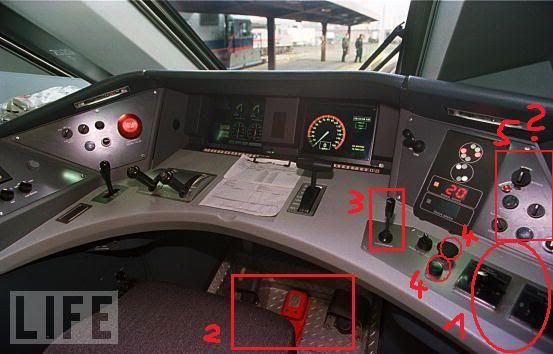

Image
1 - Most likely the controls for the frontlights/backlights/flashlights
2 - Some pedals (I guess they are for safety reasons, e.g. engineer has to push them every 30 seconds or so, please DON'T SCRIPT THIS *!lol!* )
3 - The lever above this lever is the Horn!!!
4 - One of these must be the Bell
5 - Some of these must be the controlls for the wipers (I guess)
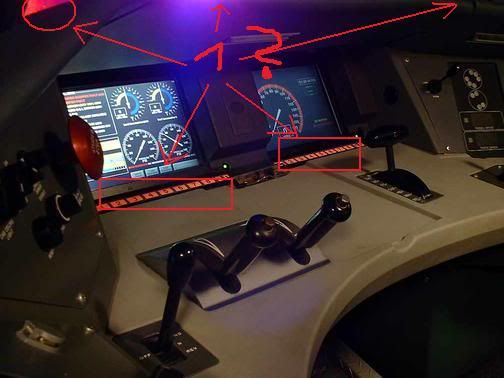
Image
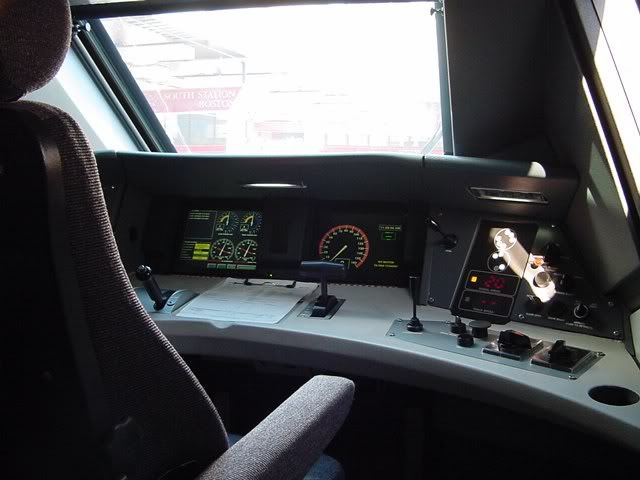
1 - buttons seems to be illuminated in red coulor, at least the buttons of the displays (I guess), I don't think the other lights are red
Image
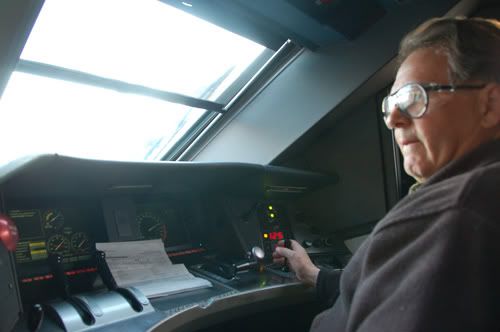
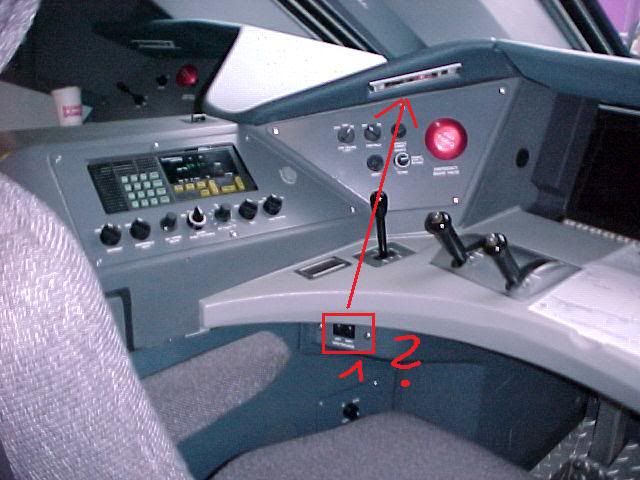
left side of engineer's controls
1 - Could to be the switches for all the in-cab lights (I guess) NO! - It seems every light has it's own switch at the right side (next to every single light in white) Or NO? I really don't know.
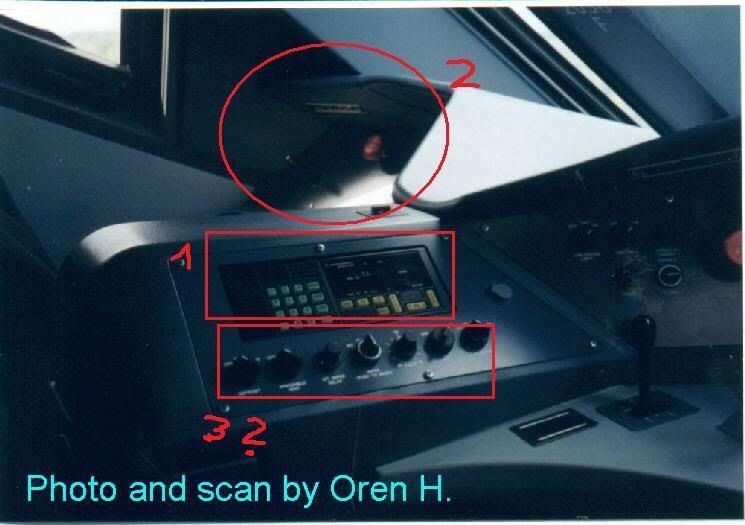
Image
1 - Radio
2 - Control/Diplay stand for second engineer or conductor (positioned under the second window of the cab)
3 - Maybe the Cruise Control (I guess)
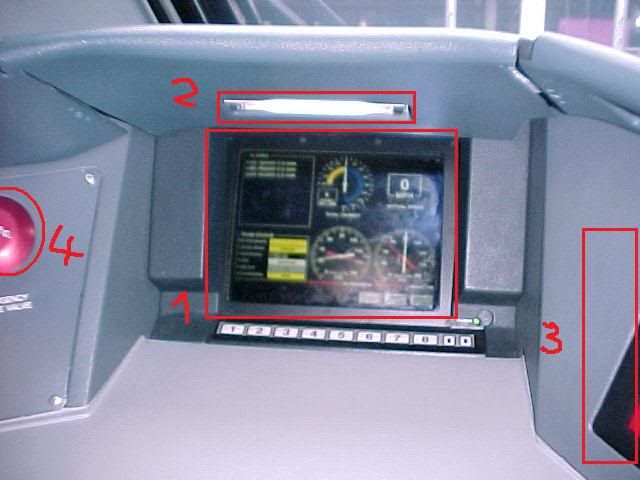
Image
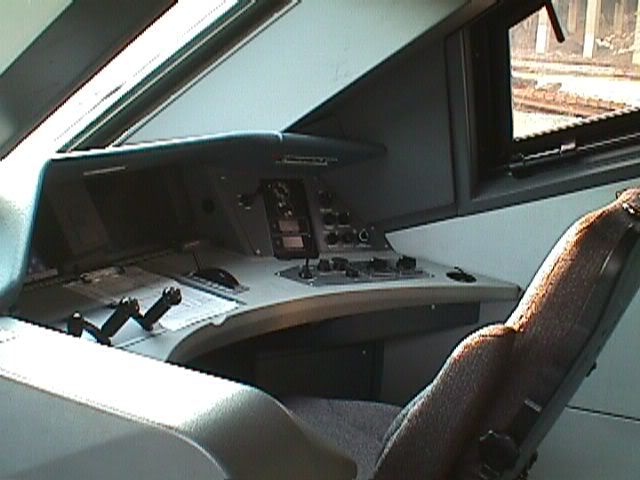
Conductor's Control Stand
1 - Same display as the engineer has for brake and power values, also a digital speedometer (rectangle upper right side)
2 - Light
3 - some buttons here on a black plate (see picture in next post)
4 - Emergency Stop

Best regards,
Timm

Stay Tuned, I Have More Pics In Preparation!
Last edited by micaelcorleone on Wed May 25, 2011 8:46 am, edited 8 times in total.
User avatar
micaelcorleone
 
Posts: 1668
Joined: Tue Oct 05, 2010 11:04 am
Location: Bavaria, Germany

Re: Amtrak Acela

Unread postby micaelcorleone » Tue May 24, 2011 12:56 pm

As promised, more pics for you:

Image
cupholder on the right side :D

Image
Image
Image

The conductor's/second control stand:
Image
Last edited by micaelcorleone on Tue May 24, 2011 3:58 pm, edited 1 time in total.
User avatar
micaelcorleone
 
Posts: 1668
Joined: Tue Oct 05, 2010 11:04 am
Location: Bavaria, Germany

Re: Amtrak Acela

Unread postby PapaXpress » Tue May 24, 2011 1:23 pm

uh... if I didn't know any better then #10 is an ash tray.

The last time I saw one of those was on an old L10-11 when we visited San Francisco air port on a field trip (grade school).
Image
"Just post some random unrelated text. We have members here who can help you with that." ~ Chacal
"When all else fails, read the instructions... if that doesn't work either, try following them." ~ Old Prof
Image
The Grade Crossing - Atlanta North Project - Virtual Rail Creations
User avatar
PapaXpress
 
Posts: 5147
Joined: Sat Oct 23, 2010 10:30 pm
Location: that "other" timezone

Re: Amtrak Acela

Unread postby SithMurcielago » Tue May 24, 2011 2:50 pm

I guess Timm took over my job with getting the tough photos. I guess I will get the Passenger interior photos and all the LEDs ready for when Reppo ask for them. You also got to get the the tech information on these trains I have a set of them on my forum here search though for what you are looking for and let me know if you need more.

http://s4.zetaboards.com/railroadpol/index/


You guys alos might want to consider using an object to and placing it on the tracks to trigger the automated announcements the same way the AWS on the UK locomotives work.
Was formely known as Stmbuzz
For Train Blueprints, information visit my site at:
http://s4.zetaboards.com/railroadpol
Blog:
http://necrw.blogspot.com/
User avatar
SithMurcielago
 
Posts: 541
Joined: Sun Aug 15, 2010 12:24 am
Location: New York, USA

Re: Amtrak Acela

Unread postby SithMurcielago » Tue May 24, 2011 2:59 pm

Here is a close up of the display:

Image
Was formely known as Stmbuzz
For Train Blueprints, information visit my site at:
http://s4.zetaboards.com/railroadpol
Blog:
http://necrw.blogspot.com/
User avatar
SithMurcielago
 
Posts: 541
Joined: Sun Aug 15, 2010 12:24 am
Location: New York, USA

Re: Amtrak Acela

Unread postby SithMurcielago » Tue May 24, 2011 3:15 pm

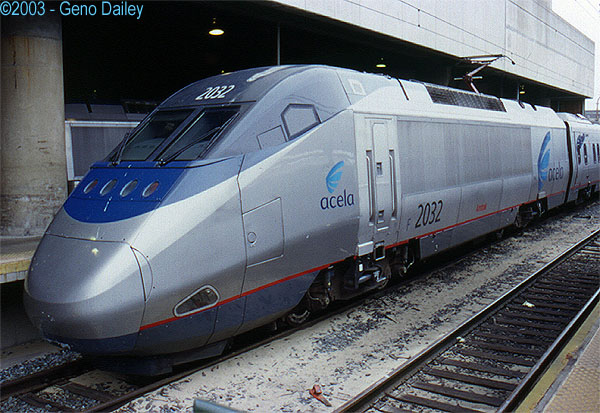
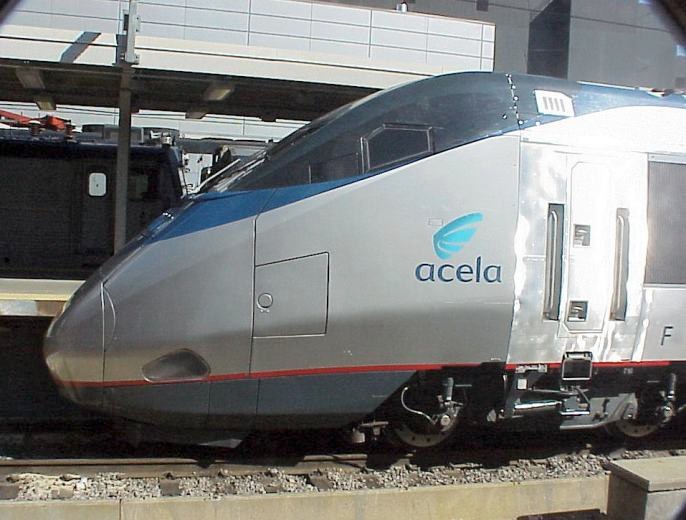
And here is the best I can give you on the Nose Curves:

*Nose, You can use the bombardier Jet Train as a Guide as well the are same with the Acela Express.

Image
Image


http://www.railpictures.net/viewphoto.php?id=30780
Was formely known as Stmbuzz
For Train Blueprints, information visit my site at:
http://s4.zetaboards.com/railroadpol
Blog:
http://necrw.blogspot.com/
User avatar
SithMurcielago
 
Posts: 541
Joined: Sun Aug 15, 2010 12:24 am
Location: New York, USA

Re: Amtrak Acela

Unread postby micaelcorleone » Tue May 24, 2011 4:06 pm

stmbuzz wrote:You guys alos might want to consider using an object to and placing it on the tracks to trigger the automated announcements the same way the AWS on the UK locomotives work.

Do you mean: "Train approaching, please remind behind yellow line." ? A good idea Stephen. !!*ok*!! Better adress this to RSC. They build the route.
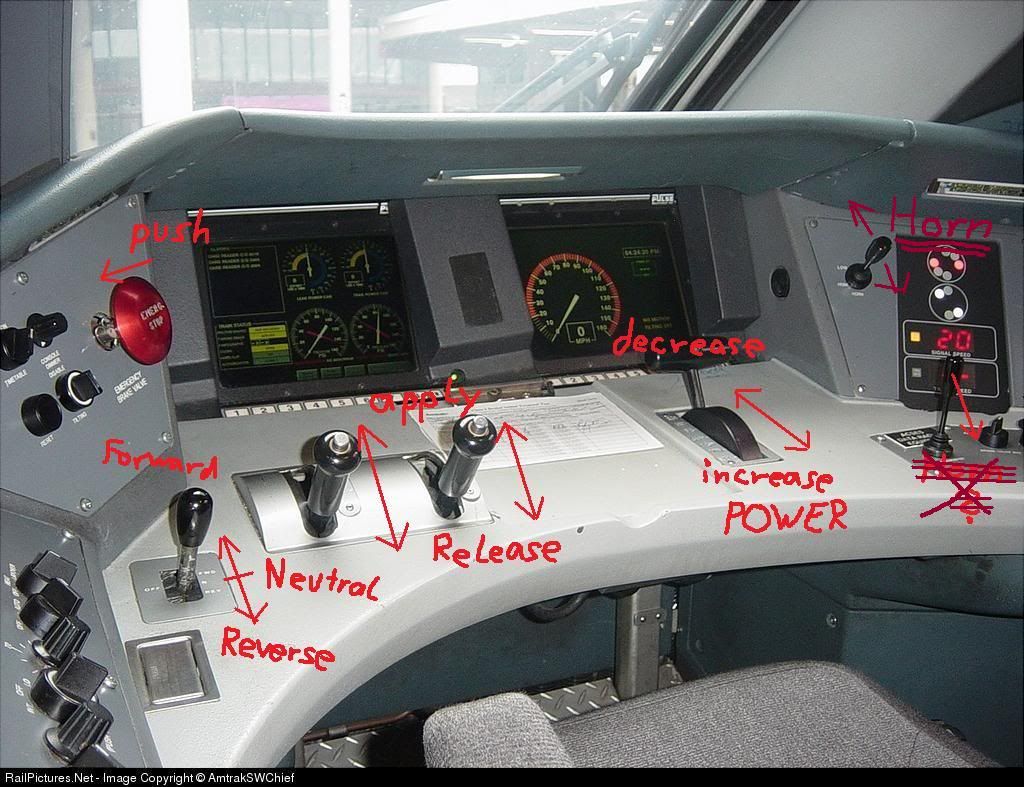

More shots for you Reppo.
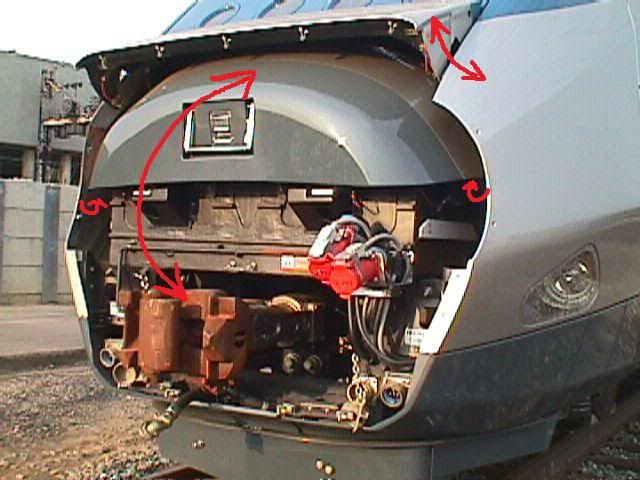
I thought about the movement of the levers and the hatch.

Image

Image

Haven't seen any roofshots so far, so I hope all these details are present. *!greengrin!*
Image

Enough pictures. I hope you are now well equipped to model everything accurately Reppo. !*salute*!
Last edited by micaelcorleone on Wed May 25, 2011 8:04 am, edited 5 times in total.
User avatar
micaelcorleone
 
Posts: 1668
Joined: Tue Oct 05, 2010 11:04 am
Location: Bavaria, Germany

Re: Amtrak Acela

Unread postby styckx » Tue May 24, 2011 4:07 pm

This thread is awesome with all the reference material flowing in from members. !!*ok*!!
User avatar
styckx
 
Posts: 992
Joined: Wed Jun 30, 2010 5:27 pm

Re: Amtrak Acela

Unread postby IIIIIREPOIIIII » Tue May 24, 2011 4:10 pm

I made a fan made comming soon video for the acela the link is in the General Discussion area !!*ok*!!
No beast so fierce but knows some touch of pity, but I know none, therefore am no beast.
~ William Shakespeare ~


"WILL WORK FOR TRAINS"

~IIIIIREPOIIIII~
User avatar
IIIIIREPOIIIII
 
Posts: 204
Joined: Sun Apr 03, 2011 2:38 pm
Location: PA

Re: Amtrak Acela

Unread postby SithMurcielago » Tue May 24, 2011 7:18 pm

Do you mean: "Train approaching, please remind behind yellow line." ? A good idea Stephen. !!*ok*!! Better adress this to RSC. They build the route.

That and the onboard one to annouce the station. I think this can be done for the Regional. We just need a nice voice from RSC to grace the speakers lol!

Oh if any one wants to sample the sounds i collected onboard some of the NEc trains like the Amfleet, or the Acela let me know so i can send it to you. They are all clean, Ic an get some announcement sounds as well.


only the passenger cars tilt, no the powercars!!!!!!


Are U sure about that?
Was formely known as Stmbuzz
For Train Blueprints, information visit my site at:
http://s4.zetaboards.com/railroadpol
Blog:
http://necrw.blogspot.com/
User avatar
SithMurcielago
 
Posts: 541
Joined: Sun Aug 15, 2010 12:24 am
Location: New York, USA

Re: Amtrak Acela

Unread postby SithMurcielago » Tue May 24, 2011 7:33 pm

Here as i mention the Interior LED Display for all the Cars

http://www.youtube.com/watch?v=5vWJijAy ... re=related

Take a 3d tour of the Acela Express It is worth your wild (Its a gold mine so start digging)

http://www.global-rail-support.com/fam-acela-tours.htm

http://www.360360.com/trains/acela.html


History Channel Documentary on Acela express:

http://www.youtube.com/watch?v=lqa6mkXyFfM&NR=1

They should do the Auto Train. That is an extreme Train.
Was formely known as Stmbuzz
For Train Blueprints, information visit my site at:
http://s4.zetaboards.com/railroadpol
Blog:
http://necrw.blogspot.com/
User avatar
SithMurcielago
 
Posts: 541
Joined: Sun Aug 15, 2010 12:24 am
Location: New York, USA

Re: Amtrak Acela

Unread postby micaelcorleone » Wed May 25, 2011 7:56 am

stmbuzz wrote:only the passenger cars tilt, no the powercars!!!!!

Are U sure about that?

No, I'm not. The video you've posted tells something other, but the site here (http://www.trainweb.org/tgvpages/acela.html) says that the Powercars don't tilt. I don't know. !*don-know!*


These are some amazing links stmbuzz, especially the 360° cabview in this link.
You should really have a look Reppo.
User avatar
micaelcorleone
 
Posts: 1668
Joined: Tue Oct 05, 2010 11:04 am
Location: Bavaria, Germany

Re: Amtrak Acela

Unread postby Reppo » Wed May 25, 2011 10:57 am

Hello all!!

Thank you very much for this lot of information and good tips. My mainly task currently is the cab, so I think I will use each data you have given here. Thanks again. *!!wink!!*

micaelcorleone wrote:These are some amazing links stmbuzz, especially the 360° cabview in this link.
You should really have a look Reppo.


I can't install the necessary plug-in to get 360º viewing. I can download the plugin and I think this is correctly installed in IE 8, but when I try t load the images the browser stops, and crashes, and it asks me to talk with Mr. Gates. !*not-ok*!
Regarding Firefox the luck is worse. The plugin for mozzila, netscape and opera doesn't install automaticly, when Firefox asks to install manualy the process is freezes and the plugin never installs. I really want to watch this images, does somebody have the same problems?

Thanks in advance.

Regards.
Image
The man who doesn't follow his vocation betrays himself and condemns himself to unhappiness.
User avatar
Reppo
 
Posts: 39
Joined: Sat May 07, 2011 10:42 am

Re: Amtrak Acela

Unread postby micaelcorleone » Wed May 25, 2011 11:05 am

Reppo wrote:I can't install the necessary plug-in to get 360º viewing. I can download the plugin and I think this is correctly installed in IE 8, but when I try t load the images the browser stops, and crashes, and it asks me to talk with Mr. Gates. !*not-ok*!
Regarding Firefox the luck is worse. The plugin for mozzila, netscape and opera doesn't install automaticly, when Firefox asks to install manualy the process is freezes and the plugin never installs. I really want to watch this images, does somebody have the same problems?

It worked well for me with the latest IE 9. The explorer asked me to install the plugin, I pressed install and everything worked fine (a miracle for IE9 *!lol!* ).

Regarding the cab: As there seems to be a lack of close cabshots in a good resolution where you can see the labels on all the levers and buttoms, why can't Railsimulator.com ask Amtrak to let an engineer make some shots of the cab for you? Or that there is an Acela engineer who can give you some advice?
Should be not too difficult as they seem to have a license from Amtrak now.
User avatar
micaelcorleone
 
Posts: 1668
Joined: Tue Oct 05, 2010 11:04 am
Location: Bavaria, Germany

Re: Amtrak Acela

Unread postby Reppo » Wed May 25, 2011 11:41 am

Thank you, I have updated to IE 9 and now I can see the 360º images without problems.

Regards.
Image
The man who doesn't follow his vocation betrays himself and condemns himself to unhappiness.
User avatar
Reppo
 
Posts: 39
Joined: Sat May 07, 2011 10:42 am

PreviousNext

Return to Freeware WIP

Who is online

Users browsing this forum: GogebicChief and 1 guest