Help Aliasing Headlight!
 Posted: Tue Oct 25, 2016 4:38 pm
Hello All,
I have been porting over the SD60M headlight flare to other locomotives because it looks great! I am having trouble with the Steven's Pass GP38 however:
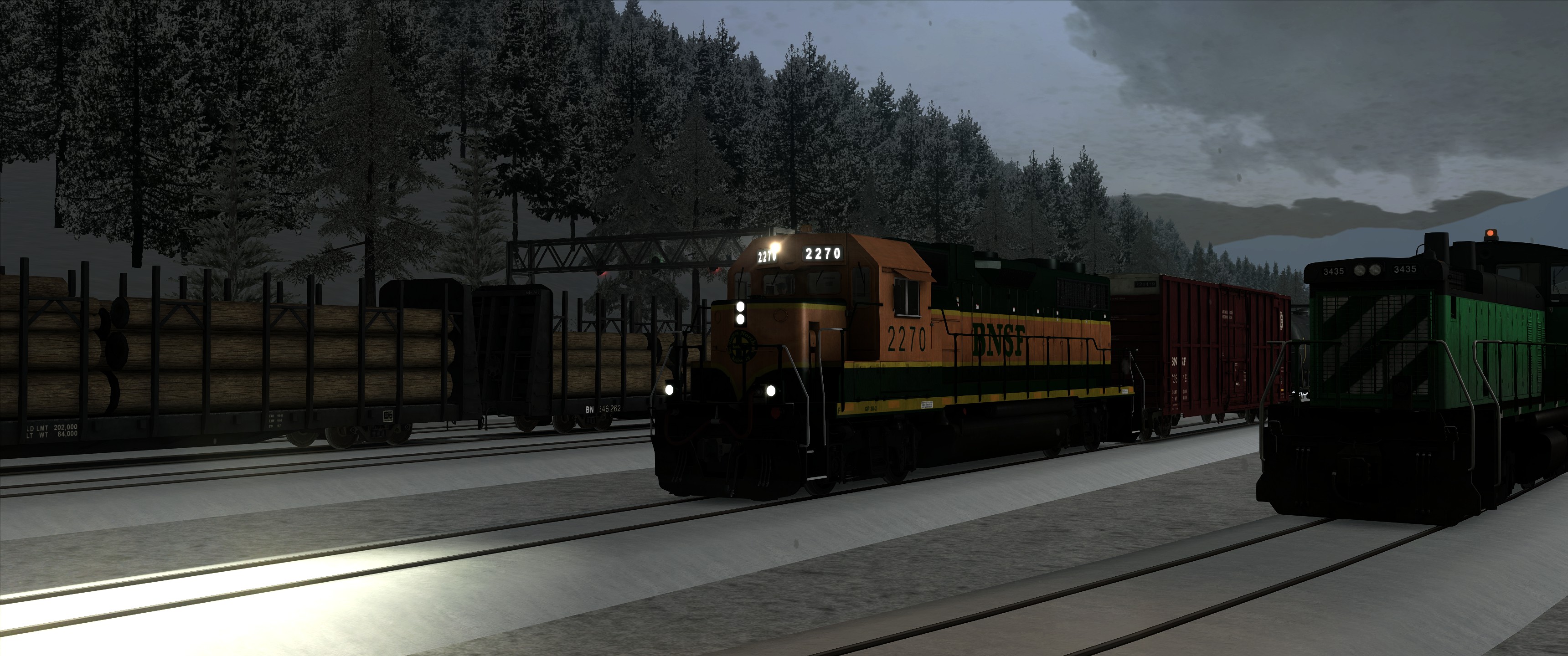
As you can see, the light is too high. So I am looking around for the XYZ coords to move this. Would it be in the Engine Bin or the texture file or elsewhere?
To get this far I add this to the GP38-2_Main_Headlight.xml after changing it to a Headlight blueprint from a spotlight blueprint (the SD60M is checked in the scenario)
So there is obviously 4 "scale" settings but I don't want to adjust the scale of the light I want to move it. I realize this setting must be elsewhere... but where
Appreciate the help
I have been porting over the SD60M headlight flare to other locomotives because it looks great! I am having trouble with the Steven's Pass GP38 however:
As you can see, the light is too high. So I am looking around for the XYZ coords to move this. Would it be in the Engine Bin or the texture file or elsewhere?
To get this far I add this to the GP38-2_Main_Headlight.xml after changing it to a Headlight blueprint from a spotlight blueprint (the SD60M is checked in the scenario)
- Code: Select all
         <HeadLightFlareComponent>
            <cHeadLightFlareComponentBlueprint>
               <FlareTextureID d:type="cDeltaString">RSC\SD60MPack01\RailVehicles\Diesel\Engine\Textures\[00]flare_nm</FlareTextureID>
               <FlareSizeX d:type="sFloat32" d:alt_encoding="0000000000003140" d:precision="string">17</FlareSizeX>
               <FlareSizeY d:type="sFloat32" d:alt_encoding="0000000000003140" d:precision="string">17</FlareSizeY>
               <FlareStartSizeX d:type="sFloat32" d:alt_encoding="000000000000F03F" d:precision="string">1</FlareStartSizeX>
               <FlareStartSizeY d:type="sFloat32" d:alt_encoding="000000000000F03F" d:precision="string">1</FlareStartSizeY>
               <LensFlareTextureID d:type="cDeltaString">RSC\SD60MPack01\RailVehicles\Diesel\Engine\Textures\[00]lensflare_nm</LensFlareTextureID>
               <NumFlareTextures d:type="sInt32">4</NumFlareTextures>
               <FadeStartDistance d:type="sFloat32" d:alt_encoding="0000000000000000" d:precision="string">0</FadeStartDistance>
               <FadeEndDistance d:type="sFloat32" d:alt_encoding="0000000000E07540" d:precision="string">350</FadeEndDistance>
               <LensFlareIntensity d:type="sFloat32" d:alt_encoding="000000A09999B93F" d:precision="string">0.1</LensFlareIntensity>
               <ExtrusionOffset d:type="sFloat32" d:alt_encoding="000000000000F03F" d:precision="string">1</ExtrusionOffset>
               <LensFlare>
                  <cHeadLightFlareComponentBlueprint-sLensFlare d:id="14328">
                     <ImageIndex d:type="sInt32">0</ImageIndex>
                     <LensScaleX d:type="sFloat32" d:alt_encoding="000000000000F03F" d:precision="string">1</LensScaleX>
                     <LensScaleY d:type="sFloat32" d:alt_encoding="000000000000F03F" d:precision="string">1</LensScaleY>
                     <LensOffset d:type="sFloat32" d:alt_encoding="000000000000F03F" d:precision="string">1</LensOffset>
                  </cHeadLightFlareComponentBlueprint-sLensFlare>
                  <cHeadLightFlareComponentBlueprint-sLensFlare d:id="14333">
                     <ImageIndex d:type="sInt32">1</ImageIndex>
                     <LensScaleX d:type="sFloat32" d:alt_encoding="000000A09999C93F" d:precision="string">0.2</LensScaleX>
                     <LensScaleY d:type="sFloat32" d:alt_encoding="000000A09999C93F" d:precision="string">0.2</LensScaleY>
                     <LensOffset d:type="sFloat32" d:alt_encoding="000000000000E83F" d:precision="string">0.75</LensOffset>
                  </cHeadLightFlareComponentBlueprint-sLensFlare>
                  <cHeadLightFlareComponentBlueprint-sLensFlare d:id="14338">
                     <ImageIndex d:type="sInt32">2</ImageIndex>
                     <LensScaleX d:type="sFloat32" d:alt_encoding="000000A09999C93F" d:precision="string">0.2</LensScaleX>
                     <LensScaleY d:type="sFloat32" d:alt_encoding="000000A09999C93F" d:precision="string">0.2</LensScaleY>
                     <LensOffset d:type="sFloat32" d:alt_encoding="000000000000D03F" d:precision="string">0.25</LensOffset>
                  </cHeadLightFlareComponentBlueprint-sLensFlare>
                  <cHeadLightFlareComponentBlueprint-sLensFlare d:id="14343">
                     <ImageIndex d:type="sInt32">3</ImageIndex>
                     <LensScaleX d:type="sFloat32" d:alt_encoding="000000A09999C93F" d:precision="string">0.2</LensScaleX>
                     <LensScaleY d:type="sFloat32" d:alt_encoding="000000A09999C93F" d:precision="string">0.2</LensScaleY>
                     <LensOffset d:type="sFloat32" d:alt_encoding="000000000000E03F" d:precision="string">0.5</LensOffset>
                  </cHeadLightFlareComponentBlueprint-sLensFlare>
               </LensFlare>
            </cHeadLightFlareComponentBlueprint>
         </HeadLightFlareComponent>
So there is obviously 4 "scale" settings but I don't want to adjust the scale of the light I want to move it. I realize this setting must be elsewhere... but where
Appreciate the help


