
This is a new situation for me: some of the Steam Workshop scenarios I've downloaded recently cannot be run because their Start button is greyed out. This is not a matter of missing DLC.
Specifically, right now this applies to Chicago-Aurora Deliveries Parts 1 and 2, which appear in the Subscribed column on the Workshop tab, but cannot be started. Actually, I managed to run Part 1 yesterday, but can't remember how and today its Start and Resume buttons are greyed out.
Another Steam mystery!?!?
Some subscribed workshop scenarios cannot be driven
First unread post • 13 posts
• Page 1 of 1
Some subscribed workshop scenarios cannot be driven
 by OldProf » Sun Nov 15, 2015 4:22 pm
Tom Pallen (Old Prof)
{Win 10 Home 64-bit; Intel Core i7 6700 @ 3.40GHz; 16.0GB Single-Channel @ 1063 MHz (15-15-15-364); 2047MB NVIDIA GeForce GTX 960}
{Win 10 Home 64-bit; Intel Core i7 6700 @ 3.40GHz; 16.0GB Single-Channel @ 1063 MHz (15-15-15-364); 2047MB NVIDIA GeForce GTX 960}
-

OldProf - Posts: 2743
- Joined: Wed Sep 09, 2009 10:09 am
Re: Some subscribed workshop scenarios cannot be driven
by robbit » Sun Nov 15, 2015 6:56 pm
You may need to go into the standard scenarios (or Career if that be the case) and start from within the route's scenario section
- robbit
- Posts: 838
- Joined: Fri Jul 15, 2011 11:29 am
- Location: Maine
Re: Some subscribed workshop scenarios cannot be driven
by OldProf » Mon Nov 16, 2015 11:07 am
I submitted a ticket to Dovetail yesterday and received this reply today:
Not very helpful, but I did find the scenarios in Workshop again and forwarded this information to the scenarios' creator. It's interesting that Steam allowed the scenarios in question to upload in view of the publisher's reluctance to ignore even the simplest errors. Ah, well, it's the imperfections that keep life interesting. Isn't it?
The "Drive" button being greyed out on workshop items is a fault caused by the workshop developer.
They may have not set certain parameters correctly or may have not built the scenario correctly.
We cannot do anything to remedy this however as it is user created content and we suggest that you attempt to contact the creator.
Not very helpful, but I did find the scenarios in Workshop again and forwarded this information to the scenarios' creator. It's interesting that Steam allowed the scenarios in question to upload in view of the publisher's reluctance to ignore even the simplest errors. Ah, well, it's the imperfections that keep life interesting. Isn't it?
Tom Pallen (Old Prof)
{Win 10 Home 64-bit; Intel Core i7 6700 @ 3.40GHz; 16.0GB Single-Channel @ 1063 MHz (15-15-15-364); 2047MB NVIDIA GeForce GTX 960}
{Win 10 Home 64-bit; Intel Core i7 6700 @ 3.40GHz; 16.0GB Single-Channel @ 1063 MHz (15-15-15-364); 2047MB NVIDIA GeForce GTX 960}
-
OldProf - Posts: 2743
- Joined: Wed Sep 09, 2009 10:09 am
Re: Some subscribed workshop scenarios cannot be driven
by trev123 » Mon Nov 16, 2015 3:28 pm
I too have had the grey out drive button. Gone into TS and played the scenario under the standard tab and after playing it have gone back to the workshop screen and the drive button is alright. Not saying this happens to all of them.
Intel i5-10600K CPU, Asus TUF GAMING Z490-Plus (Wi-Fi) MB, Graphics Asus RTX 3060 TI 8GB OC TUF gaming card Windows 11 Home 64 bit, 16 GB Corsair Vengeance DDR4 ram, Viewsonic VX2728 LED 1080P FHD Monitor, Samsung 1TB SSD + other conventional drives, Corsair 750W PSU.
-

trev123 - Posts: 2333
- Joined: Mon May 19, 2014 9:40 pm
- Location: Home Of The Americas Cup
Re: Some subscribed workshop scenarios cannot be driven
by peterhayes » Mon Nov 16, 2015 5:41 pm
Tom
This can also happen if the WS scenario creators use 3rd party re-skins. When you load TS2016 and go to the Workshop page the scenario can be grayed out because TS2016 "thinks" something is "missing" and it can't figure out what it is so it won't let you load it from that screen.
Like everyone says you just have to load from the Standard, Career, QD tabs.
pH
This can also happen if the WS scenario creators use 3rd party re-skins. When you load TS2016 and go to the Workshop page the scenario can be grayed out because TS2016 "thinks" something is "missing" and it can't figure out what it is so it won't let you load it from that screen.
Like everyone says you just have to load from the Standard, Career, QD tabs.
pH
-

peterhayes - Posts: 807
- Joined: Sun Oct 02, 2011 12:34 am
- Location: Antipodes
Re: Some subscribed workshop scenarios cannot be driven
by OldProf » Tue Nov 17, 2015 10:03 am
peterhayes wrote:Tom
This can also happen if the WS scenario creators use 3rd party re-skins. When you load TS2016 and go to the Workshop page the scenario can be grayed out because TS2016 "thinks" something is "missing" and it can't figure out what it is so it won't let you load it from that screen.
Like everyone says you just have to load from the Standard, Career, QD tabs.
pH
That's a good idea, Peter, but in my experience, a workshop scenario doesn't show up at all in those other tabs until it has been started from the Workshop tab. What am I missing?
Tom Pallen (Old Prof)
{Win 10 Home 64-bit; Intel Core i7 6700 @ 3.40GHz; 16.0GB Single-Channel @ 1063 MHz (15-15-15-364); 2047MB NVIDIA GeForce GTX 960}
{Win 10 Home 64-bit; Intel Core i7 6700 @ 3.40GHz; 16.0GB Single-Channel @ 1063 MHz (15-15-15-364); 2047MB NVIDIA GeForce GTX 960}
-
OldProf - Posts: 2743
- Joined: Wed Sep 09, 2009 10:09 am
Re: Some subscribed workshop scenarios cannot be driven
by plethaus » Tue Nov 17, 2015 10:13 am
OldProf wrote:peterhayes wrote:Tom
This can also happen if the WS scenario creators use 3rd party re-skins. When you load TS2016 and go to the Workshop page the scenario can be grayed out because TS2016 "thinks" something is "missing" and it can't figure out what it is so it won't let you load it from that screen.
Like everyone says you just have to load from the Standard, Career, QD tabs.
pH
That's a good idea, Peter, but in my experience, a workshop scenario doesn't show up at all in those other tabs until it has been started from the Workshop tab. What am I missing?
All workshop scenarios should show up under the normal tabs. I too have run into the grey drive button, but I've always been able to run them fine by going through the normal tabs as a work around. The subscribed workshop screen is really more of a shortcut to play them.
- plethaus
- Posts: 283
- Joined: Fri Jul 03, 2009 12:17 am
Re: Some subscribed workshop scenarios cannot be driven
by peterhayes » Tue Nov 17, 2015 3:08 pm
Hi Tom
You are not "missing" anything, but you have to "load" the scenario/route by going to the workshop page first - it can't be seen in any category (Career, Standard, QD, etc) until its "loaded". The workshop tab is TS2015's interface with workshop scenarios, and its the only way usually to load them into TS2015. They do occasionally load in the "background" but the norm is to load them by opening the WS tab.
You have to be extra careful with titles too sometimes the scenario creator gives you a title on the workshop page but when you load it into TS2016 via the workshop button it may display a different name. In extreme cases it can have a totally different name when loaded from the Career, Standard, QD, etc tabs. Weird I know, but its the way that the scenario has been put together.
The drive button if greyed out is probably as DTG reports above and then you have to go to the other tabs Career, Standard, QD, etc in order to actually run the scenario.
Regards
pH
That's a good idea, Peter, but in my experience, a workshop scenario doesn't show up at all in those other tabs until it has been started from the Workshop tab. What am I missing?
You are not "missing" anything, but you have to "load" the scenario/route by going to the workshop page first - it can't be seen in any category (Career, Standard, QD, etc) until its "loaded". The workshop tab is TS2015's interface with workshop scenarios, and its the only way usually to load them into TS2015. They do occasionally load in the "background" but the norm is to load them by opening the WS tab.
You have to be extra careful with titles too sometimes the scenario creator gives you a title on the workshop page but when you load it into TS2016 via the workshop button it may display a different name. In extreme cases it can have a totally different name when loaded from the Career, Standard, QD, etc tabs. Weird I know, but its the way that the scenario has been put together.
The drive button if greyed out is probably as DTG reports above and then you have to go to the other tabs Career, Standard, QD, etc in order to actually run the scenario.
Regards
pH
-
peterhayes - Posts: 807
- Joined: Sun Oct 02, 2011 12:34 am
- Location: Antipodes
Re: Some subscribed workshop scenarios cannot be driven
by OldProf » Wed Nov 18, 2015 11:47 am
First of all, thanks to Peter for telling me what I already knew . . . no, seriously, a review never does any harm and may just eliminate a bit of ignorance in someone else.
Secondly, I did manage to launch the "All Stops to Aurora Part 2" scenario yesterday evening from the Drive>Career tab, albeit with the common hitch that it refused to load at first, claiming that "Tracks.bin" was missing -- I know how to get around that, too. I ran part of the scenario, but stopped and saved before finishing.
So, here's what appears today on the scenario's tab:
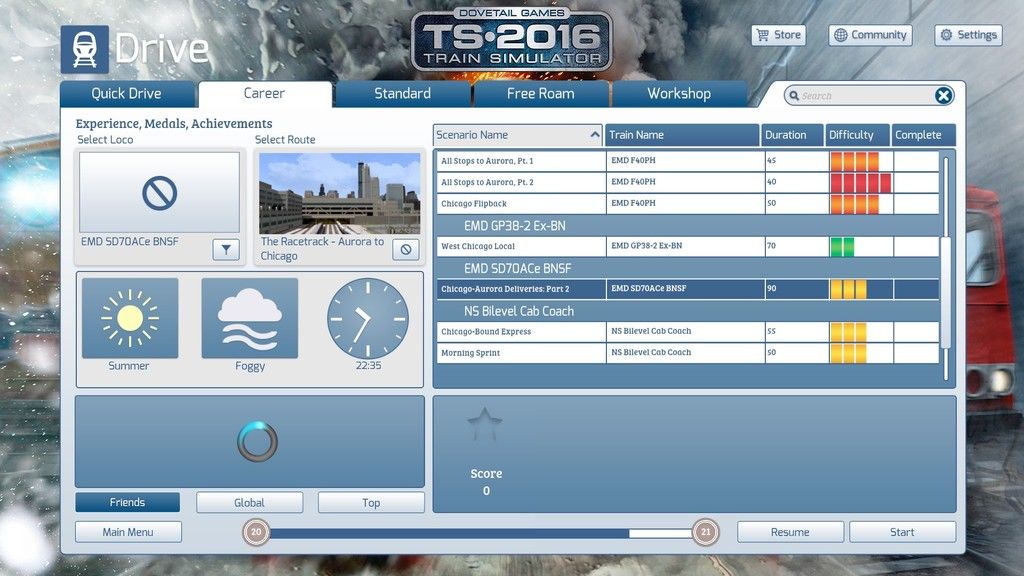
Note that 1) both the Start and the Resume buttons are available -- as they should be, but the Player Engine is marked as unavailable (even though I do own that DLC), and there's a whirligig spinning uselessly at lower left. So far, so good, one might think, but wait . . .
Never being content with leaving well enough alone, I decided to take a gander at the very same scenario's Workshop page (once it finished "loading" everything that it had already "loaded" yesterday), which still looked exactly as it did yesterday: no indication of missing DLC and the Buy Add-ons button appropriately greyed out; b-u-t, the Drive button is also unavailable, even though the resume button is available.
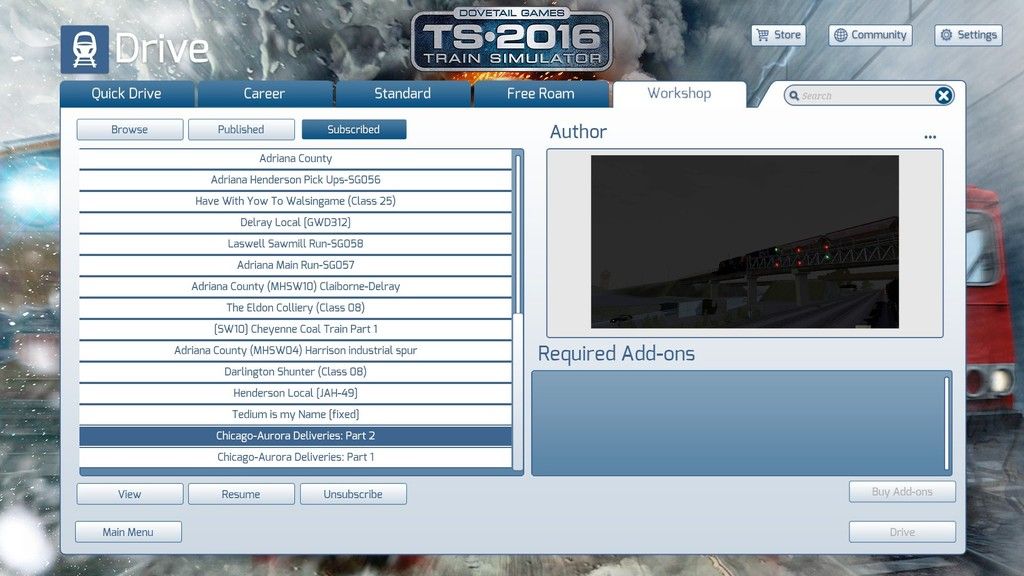
What I'm saying, Peter et alia, is that this particular TS "feature" is still in a state of SNAFU, and apparently will continue to be so even though it is, or should be anyway, a major source of revenue for DTG [folks wanting to play a particular scenario discover that they lack this or that DLC and decide to buy it even though they haven't found it worth the cost previously, as I know all too well, having fallen for this stunt more than once ]. Yet another clever marketing strategy clumsily deployed.
Essentially, I like this simulator very much, as indicated by my 7,672 hours of playing time, but then there are these minor glitches that become major irritations as time passes.
I apologize for letting my mouth run -- all-day rain has that effect on me.
Secondly, I did manage to launch the "All Stops to Aurora Part 2" scenario yesterday evening from the Drive>Career tab, albeit with the common hitch that it refused to load at first, claiming that "Tracks.bin" was missing -- I know how to get around that, too. I ran part of the scenario, but stopped and saved before finishing.
So, here's what appears today on the scenario's tab:

Note that 1) both the Start and the Resume buttons are available -- as they should be, but the Player Engine is marked as unavailable (even though I do own that DLC), and there's a whirligig spinning uselessly at lower left. So far, so good, one might think, but wait . . .
Never being content with leaving well enough alone, I decided to take a gander at the very same scenario's Workshop page (once it finished "loading" everything that it had already "loaded" yesterday), which still looked exactly as it did yesterday: no indication of missing DLC and the Buy Add-ons button appropriately greyed out; b-u-t, the Drive button is also unavailable, even though the resume button is available.

What I'm saying, Peter et alia, is that this particular TS "feature" is still in a state of SNAFU, and apparently will continue to be so even though it is, or should be anyway, a major source of revenue for DTG [folks wanting to play a particular scenario discover that they lack this or that DLC and decide to buy it even though they haven't found it worth the cost previously, as I know all too well, having fallen for this stunt more than once
]. Yet another clever marketing strategy clumsily deployed.Essentially, I like this simulator very much, as indicated by my 7,672 hours of playing time, but then there are these minor glitches that become major irritations as time passes.
I apologize for letting my mouth run -- all-day rain has that effect on me.
Tom Pallen (Old Prof)
{Win 10 Home 64-bit; Intel Core i7 6700 @ 3.40GHz; 16.0GB Single-Channel @ 1063 MHz (15-15-15-364); 2047MB NVIDIA GeForce GTX 960}
{Win 10 Home 64-bit; Intel Core i7 6700 @ 3.40GHz; 16.0GB Single-Channel @ 1063 MHz (15-15-15-364); 2047MB NVIDIA GeForce GTX 960}
-
OldProf - Posts: 2743
- Joined: Wed Sep 09, 2009 10:09 am
Re: Some subscribed workshop scenarios cannot be driven
by peterhayes » Wed Nov 18, 2015 2:43 pm
Tom
Sorry
 I missed the point!
I see what you mean, again that can happen if the engine is in an ap file and they sometimes will not display - probably - how the scenario was written! It could also be a repaint not picked up, or it could be a Market Place Item.
The scenario will usually load OK though?
Regards
pH
Sorry
I missed the point! I see what you mean, again that can happen if the engine is in an ap file and they sometimes will not display - probably - how the scenario was written! It could also be a repaint not picked up, or it could be a Market Place Item.
The scenario will usually load OK though?
Regards
pH
-
peterhayes - Posts: 807
- Joined: Sun Oct 02, 2011 12:34 am
- Location: Antipodes
Re: Some subscribed workshop scenarios cannot be driven
by OldProf » Thu Nov 19, 2015 11:16 am
peterhayes wrote:Tom
Sorry
I see what you mean, again that can happen if the engine is in an ap file and they sometimes will not display - probably - how the scenario was written! It could also be a repaint not picked up, or it could be a Market Place Item.
The scenario will usually load OK though?
Regards
pH
From the Drive>Career page, but not from the Workshop page.
Tom Pallen (Old Prof)
{Win 10 Home 64-bit; Intel Core i7 6700 @ 3.40GHz; 16.0GB Single-Channel @ 1063 MHz (15-15-15-364); 2047MB NVIDIA GeForce GTX 960}
{Win 10 Home 64-bit; Intel Core i7 6700 @ 3.40GHz; 16.0GB Single-Channel @ 1063 MHz (15-15-15-364); 2047MB NVIDIA GeForce GTX 960}
-
OldProf - Posts: 2743
- Joined: Wed Sep 09, 2009 10:09 am
Re: Some subscribed workshop scenarios cannot be driven
by trev123 » Thu Nov 19, 2015 5:13 pm
Just downloaded a WS scenario today but cannot drive from the WS page but, shows up under the Standard scenarios and you can drive it.
Intel i5-10600K CPU, Asus TUF GAMING Z490-Plus (Wi-Fi) MB, Graphics Asus RTX 3060 TI 8GB OC TUF gaming card Windows 11 Home 64 bit, 16 GB Corsair Vengeance DDR4 ram, Viewsonic VX2728 LED 1080P FHD Monitor, Samsung 1TB SSD + other conventional drives, Corsair 750W PSU.
-
trev123 - Posts: 2333
- Joined: Mon May 19, 2014 9:40 pm
- Location: Home Of The Americas Cup
Re: Some subscribed workshop scenarios cannot be driven
by OldProf » Fri Nov 20, 2015 11:07 am
trev123 wrote:Just downloaded a WS scenario today but cannot drive from the WS page but, shows up under the Standard scenarios and you can drive it.
That's what keeps the Steam experience from becoming boring: never the same glitch twice!
Tom Pallen (Old Prof)
{Win 10 Home 64-bit; Intel Core i7 6700 @ 3.40GHz; 16.0GB Single-Channel @ 1063 MHz (15-15-15-364); 2047MB NVIDIA GeForce GTX 960}
{Win 10 Home 64-bit; Intel Core i7 6700 @ 3.40GHz; 16.0GB Single-Channel @ 1063 MHz (15-15-15-364); 2047MB NVIDIA GeForce GTX 960}
-
OldProf - Posts: 2743
- Joined: Wed Sep 09, 2009 10:09 am
13 posts
• Page 1 of 1
Return to Problems and Peculiarities
Who is online
Users browsing this forum: No registered users and 2 guests